
How to Operate the Lobby Fan
How to Operate the Lobby Fan
Foothills Unitarian Church — Staff & Volunteer Reference Guide
Vendor Information
|
Vendor/Company |
N/A — in-house equipment |
|
Primary Contact |
Holly (IT / Facilities) |
|
Phone |
— |
|
|
— |
|
Support Website |
— |
|
Account Number |
— |
Step-by-Step Instructions
Step 1: Turn on power to the fan
The fan requires wall power before the remote will work. Find the wall button panel to the left of the West Entrance Doors. Press the “Fan” button (top right of the right panel). You will know power is on when the light on the button is lit.
Note: The Fan + and Fan − buttons on this panel do not control the fan speed. Use the remote control only for speed adjustment.
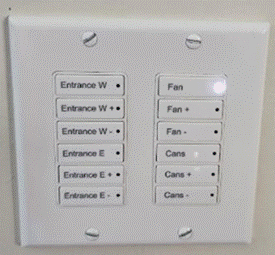
Wall button panel to the left of the West Entrance Doors. Press the “Fan” button (top right).
Step 2: Retrieve the remote control
The remote control is stored on the kitchen wall. Go to the kitchen and look on the left-hand side of the two sinks, under the shelf. The remote hangs in a holder on the wall.
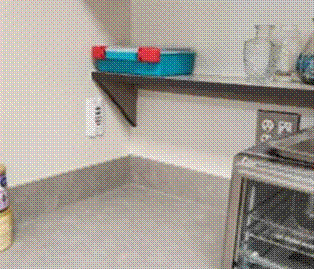
Kitchen wall to the left of the sinks — the remote holder is mounted under the shelf.
Step 3: Turn the fan on
On the remote, locate the fan symbol button (top row, center). Press it to turn the fan on. You should hear a beep confirming the fan received the signal.
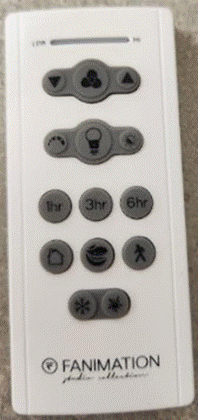
Fanimation remote control. The fan button is in the top row. Use the slider at the top to adjust speed.
Step 4: Adjust the fan speed
Use the slider at the top of the remote or the up/down arrow buttons to adjust the fan speed. Set it to whatever is comfortable for the space and event.
Step 5: Turn the fan off
When you are done, press the fan symbol button on the remote again to turn the fan off. You should hear a beep confirming it turned off.
Step 6: Return the remote
Always return the remote control to its holder on the kitchen wall when not in use. This ensures it is available for the next person who needs it.
Troubleshooting
|
Problem |
Fix |
|
Remote does not beep / fan does not respond |
Check that the Fan button on the wall panel is lit. If it is on, the remote batteries may be dead — contact Holly to replace them. |
|
Wall panel Fan button light is not coming on |
The circuit breaker for that outlet may have tripped. Contact Holly or another staff member for assistance. |
|
Remote is not in its kitchen holder |
Check nearby counter surfaces in the kitchen. If it cannot be found, contact Holly. |
FAQs
Can I use the Fan + and Fan − buttons on the wall panel to adjust speed?
No. Those buttons do not control the lobby fan speed. Use only the remote control retrieved from the kitchen.
What if I forget to return the remote?
Please make every effort to return it to the kitchen wall holder after each use. Other staff and volunteers need access to it. If you realize you have it, return it as soon as possible.
Is there a specific speed setting I should use?
There is no required setting. Adjust the speed using the remote slider or arrow buttons to whatever is comfortable for the space and event.
Who do I contact if the fan is not working?
Contact Holly (IT/Facilities) for any equipment issues with the lobby fan.
No comments to display
No comments to display