
Newcomer Email Journey
Drip Newcomer Email Sequence
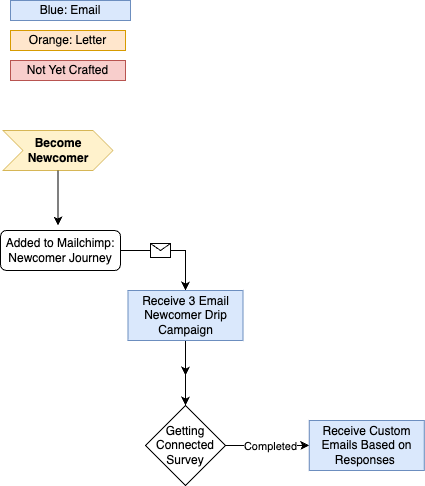
The Drip Newcomer Email Sequence is designed to warmly welcome newcomers to Foothills Unitarian Church and help them get oriented within the community. This automated sequence is initiated whenever a newcomer attends a worship service (either in person or online), which triggers their entry into a designated MailChimp Journey. The journey comprises three emails sent over three days, each encouraging engagement with the community and completion of a Getting Connected survey to guide further connection and customized follow-up.
Key Resources:
- Email Content: Email content document
- Newcomer Journey: MailChimp Journey link
- Getting Connected Survey: MailChimp Survey link
- Newcomer Survey Journey: Mailchimp Journey Link
Automation Process
1. Newcomer Journey Entry Conditions
Conditions for being added to the Newcomer Journey:
- Newcomers are identified through attendance records in Planning Center Online (PCO).
- Newcomers are tagged in Mailchimp via lists made in PCO within the List Category: PTP Communication.
- Tags can be manually added in MailChimp if necessary.
| Target | Criteria | PCO List | MailChimp Tag |
| Newcomer Attending Online for the First Time |
|
https://people.planningcenteronline.com/lists/3740492/settings |
Online Worshipper Newcomer Email List [MailChimp List] - 3740492 |
| In-Person Worship Attendance |
Any one of these actions:
And all of these:
|
https://people.planningcenteronline.com/lists/3740537 | In-Person Newcomer Email List [MailChimp List] - 3740537 |
| Parents/Guardians of Children Attending |
|
https://people.planningcenteronline.com/lists/3740582 | Family Newcomer Email List [MailChimp List] - 3740582 |
2. MailChimp Journey Details
Once tagged as a newcomer in MailChimp, the individual enters the Newcomer Journey sequence. This journey involves:
- Email #1: Customized welcome email (based on attendance type, either online or in-person).
- Email #2: Information about ways to get involved.
- Email #3: Encouragement to complete the Getting Connected survey for tailored recommendations.
The emails are sent with a one-day interval between each, ensuring engagement without overwhelming the newcomer.
3. Getting Connected Survey and Conditional Drips
Each email includes a call to action to fill out the Getting Connected survey in MailChimp. This survey collects preferences on areas of interest and ways the newcomer might want to connect further. Depending on the selections in the survey:
The survey responses trigger additional drip emails tailored to the newcomer’s interests after completing the Newcomer Journey.
Survey Options
Currently Active
- Learning about the caring network and what support Foothills offers.
- I’m interested in learning more about Unitarian Universalism and how it fits with my values.
- I’d love to get to know the staff and their roles at Foothills better.
- I'd like to understand more about how things work behind the scenes at Foothills.
- I’m curious to learn about the different groups and where I might fit in.
- I’d love to know how I can stay connected as part of the online community.
- I'd like to know more about Foothills stance on LGBTQIA+ issues
MailChimp Tag Key
| Tag | Use | Added Via |
| Newcomer Email Sequence | Everyone that starts the Newcomer Journey | Automatically Via the Journey |
|
Online Worshipper Newcomer Email List [MailChimp List] - 3740492 |
Designate first time online worshipers | PCO List that syncs with mailchimp |
| In-Person Newcomer Email List [MailChimp List] - 3740537 | Designate first time in-person worshipers | PCO List that syncs with mailchimp |
| Newcomer Email Sequence: Done | For those who complete the Newcomer Journey | Automatically Via the Journey |
| Info Survey Filled Out | When a person completes the Getting Connected Survey | Automatically via the Survey |
| Info Drip Journey Started | Was added to the Newcomer Survey Automation Journey | Automatically Via the Journey |
| Info Drip Journey Complete | Completed the Newcomer Survey Automation Journey | Automatically Via the Journey |
| Info: (fill in the blank) | There are multiple tags each with the same syntax: Info: _______. Each of them represents one of the options in the Getting Connected Survey, they are used to filter the Newcomer Survey Automation Journey so people only receive what they requested | Automatically via the Survey |
How to Add An Additional Option to the Newcomer Survey Automation

How to remove someone from a journey that was added by mistake?
Newcomer Tag Additional Content
| Target | Criteria | PCO List | MailChimp Tag |
| 2/3 Sundays after becoming Newcomer |
|
https://people.planningcenteronline.com/lists/3740758 | Newcomer (2/3 Sundays) [Mailchimp] - 3740758 |
| Missed Two Sunday (retention) |
|
https://people.planningcenteronline.com/lists/3740798 | Newcomer (Missed Two Sundays) [MailChimp List] - 3740798 |