
Reception Team
The reception team is a volunteer team who help manage the front desk and assist with administrative tasks during office hours.
Schedule
Each week will have a schedule including 6, 3-hour shifts. This will look like the following:
| Tuesday | Wednesday | Thursday | |
| Morning | 9am-12pm | 9am-12pm | 9am-12pm |
| Afternoon | 12pm-3pm | 12pm-3pm | 12pm-3pm |
The schedule will be filled on a quarterly basis with folks signing up for their availability via a team-building/training event. As any team member gets sick or needs to be able to shift their dates, they will be able to reach out to their group directly to reschedule and/or switch shifts with each other. Any shifts which do not get covered will be worked by a member of the admin team.
Responsibilities
- Answering the phone and taking messages
- Responding to voicemails
- Assisting with Admin Support
- Updating check-ins
- Creating name tags
- Creating welcome packets
- Maintaining papers at Welcome Desk for Sunday
Answering the Phone
- Make sure you have a pen and the voicemail message book.
- Ensure the card stock insert is behind the most current page so that the pressure paper doesn't bleed through
- Answer the call: “This is _____ at Foothills Unitarian. How can I help you?”
- If they say their name, write it down immediately. If you don’t fully hear or understand it, you can write down what you hear and clarify later.
- (If you have PCO access only) Searching the first 2 letters of their first & last name into PCO will generally bring up their profile if they are in our system. Sometimes this takes a little guessing and it’s okay if you can’t find it, it may just help you understand who you’re talking with
- Determine who they want to talk to/what their question or concern is. Some questions you will be able to answer & help with, some you will not.
- People will ask “is ________ around, I would like to speak with them” but unless someone is immediately accessible/nearby, we generally don’t forward calls because we only have the one phone. You can say “It looks like ________ is in a meeting right now, can I take a message or answer any questions for you?”. Callers are generally agreeable to this. People in the office appreciate this as well as most of them are not prepared to answer the phone at any given time.
- Make sure to take notes while listening to their call
- If someone is asking to speak to someone with no context, you can ask “What does this pertain to?” This will help you discern prospecting calls
- Generally, folks are asking for:
- Pastoral Care:
- We only have the capacity to provide care for folks who are engaged in our community. If someone needs to speak with a minister, inform Rev Elaine and give them her extension and/or email:
- caring@foothillsuu.org
- 970-493-5906 ex 126#
- We only have the capacity to provide care for folks who are engaged in our community. If someone needs to speak with a minister, inform Rev Elaine and give them her extension and/or email:
- Housing Assistance:
- Family Housing Network
https://www.familyhousingnetwork.org/ - Habitat for Humanity
https://fortcollinshabitat.org/ - Rainbow Villages (LGBTQ+ only)
This one is a Foothills affiliated group but a little harder to provide direct resources for as they are small. We do not immediately give people who we do not know access to this group as this is a very sensitive group dedicated to helping queer families move to safer states. Take down the callers information and give it to Lauren F or Caitlin.
- Family Housing Network
- Food Assistance:
- Mobile Food Market
We host these guys every other week at 1pm, on 1st & 3rd Sundays - Larimer County Food Bank
https://foodbanklarimer.org/ - Vindiket Foods
This is Not an official Foothills community partner but I like this one personally.
They are a food rescue that works on voluntary donations only and is run mostly by volunteers
https://www.vindeketfoods.org/
- Mobile Food Market
- Community
- Invite them to engage in our church.
- Lauren F is our newcomer and engagement coordinator and will be able to help them. Tell her we got a call and give her their information. Give the caller her email: lauren@foothillsuu.org
- If the person needs more than access to our resources, direct them to our caring team and inform Elaine of the situation. Do you best to be patient and kind with these folks, they are generally having a bad day
- caring@foothillsuu.org
- 970-493-5906 ext. 126#
- Assistance adjusting their pledge/donation
- Anyone on the admin team (Caitlin, Jenn, or Katie) can help with this
- Take down their information changes, full name, and phone number. Double check that you have the correct details by repeating them back
- Tell them you will communicate the changes to our financial team and that they will be receiving an email shortly
- Information on our Small Groups & Events Registrations:
- People are often looking for groups or info about groups that we host. Take down their information and which groups they are asking about. If they don't know what type of group they are looking for, we have groups pertaining to:
- community caring, social justice, reproductive justice, climate justice, LGBTQ+ justice, racial justice, spiritual development, processing grief, and community connection.
- Give their information to the Groups Coordinator (Caitlin) and let them know they will be reaching out soon.
- People are often looking for groups or info about groups that we host. Take down their information and which groups they are asking about. If they don't know what type of group they are looking for, we have groups pertaining to:
- Space Rentals
- If they are a small group leaders, direct them to the Group Leader Hub on Church Center and pass along the information to the Groups Coordinator.
- If they are from an external organization (i.e. not a Foothills Group Leader), direct them to our rental request page on our website: https://foothillsuu.org/reserve/
- This form does include information about pricing once the space and time has been inputted. The estimated cost can be found at the bottom of the web page.
- We do not offer our space to external groups for free, though some may ask. We are a non-profit so all of our rental income goes directly to our operating costs and is part of how we plan our budget.
- Let any external rental requester know that our Rental Manager (Jenn) will reach out to them soon with more information after they have submitted their form.
- General Comments/Questions
- Where can I watch an old service?
- Our old services can be found in Church Center
- Click More > Click Watch Worship > select any recent service or series you would like to watch
- You can also find these by going through our website:
- A copy of the sermon can also be found using these command chains - it is directly attached to each service uploaded to Church Center
- Our old services can be found in Church Center
- This was really cool and I liked it
- Make a note of who says it, thank them for letting you know, and inform staff so that they can share it with each other
- Podcast
- Our podcast is on hiatus for the moment. We want to it come back soon, we’ve just had a lot of staff changes which makes it challenging
- Where can I watch an old service?
- Music
- Our current Music Director is Sophia Miller who is based in NYC and manages a whole team of musicians
- Our current Choir Director is Benjamin Hanson.
- Choir meets weekly on Wednesdays from 6:30pm until 8pm in the Sanctuary. Anyone is welcome to join at any time
- Staff changes
- Keep it vague.
- “Unfortunately we just weren’t a good fit”
- “We are in the process of interviewing and hiring new candidates. We hope to have the position filled soon”
- Keep it vague.
- Prospecting Calls
- Be nice but tell them no
- It doesn’t matter how much they push the answer is no
- Pastoral Care:
Identifying and Responding to Hate Communications and Bad Actors
Communications to Watch out for:
- Hate Calls
- Signs to Recognize
- Angry, abusive, or threatening tone
- Provocative questions aimed at stirring up conflict
- Attempts to extract sensitive information (names, schedules, program details)
- How to Respond
- Remain calm and disengage "I'm sorry I can't help you with that"
- Hang up immediately - do not argue or engage
- Write down the time, date, and general content of the call
- Report to HR Director (Katie) immediately
- Signs to Recognize
- Phishing or Information-Seeking Attempts
- Signs to Recognize
- Requests for details about staff, participants, schedules, or programs
- Calls or emails pretending to be from trusted community members but feel "off"
- Pressure to provide information urgently
- Look for:
- odd email addresses or domain names
- typos, grammar errors, or vague language
- requests to "verify" sensitive information or "help with an emergency"
- How to Respond
- Do not share any information. Simply say "I am unable to help with that request"
- Verify requests internally: if unsure, contact supervisor or team lead
- Report attempt to Caitlin with the details provided
- Signs to Recognize
Assisting with Admin Tasks
Filling the Candy Bowl
Every day we refill a bowl of candy at the front desk. This is something that just brings little joy to everyone's day. Extra candy can be found is the white file cabinet at the front desk. When supplies are low, let staff know and we will order more. Try not to let it our stock run out!
Name Tags
Each week we must assemble and sort name tag requests as they come in. This process should not take longer than 20 minutes.
- Using the pink "I Need a New Nametag!" sheet from the welcome desk, input each name into the word document "Nametag Template Foothills"
- Once input, double check that spelling matches what was written down as best as you can. People do not always write legibly so ask a staff member to verify someones name in PCO if you are having trouble
- Print name tags to office printer on standard paper
- Name tags are creating using Avery Name Badge Inserts, Template 5390. Before copying tags onto this paper, use the light to double check spacing so that all name tags fit onto the paper correctly
- Once verified, place only the number of Avery sheets needed face up into the paper feed tray #1
- Copy the sheets. The only setting you need to adjust will be the color settings - select "Auto"
- After printing, write the date of the most recent Sunday on the back of each name tag
- Punch name tags out and put them in plastic holders
- Place newly completed name tags in file boxes at the Welcome Desk. Alphabetize tags by last name
Find Your Group Pamphlets and Welcome Desk Sheets
The Welcome Desk has various papers of which it needs multiple copies. You can find printer copies in the folder labeled "printer copies" in the brown file folder drawer of the front desk. They always need:
- Newcomer Information sheets, printed on white paper
- Name tag request sheets, printed on pink paper
- "Find Your People" Fliers
Welcome Packets
We give offer all newcomers welcome packets when they check-in with us at the Radical Welcome Desk on Sundays. Each packet includes:
- A welcome letter written by our Community Engagement Coordinator
- A copy of our most recent Annual Report
- A "Find Your People" Pamphlet
- A caring corner card
- A card with our podcast information
To build these, paper clip all the items together and place in a large white envelope. There is a stack of them on the right side of the Welcome Desk. These should never run out if possible.
Check-ins
Check-ins are part of how we monitor who is regularly engaged in our community. Often people do not check in formally and we, on the admin team, take effort to find folks who haven't checked in but who we have evidence for their attendance. The sources where we normally find these people are:
- Children's circle groups attendance
- Sunday morning volunteers list
- Newcomer and Name tag sheets from the welcome desk
- Zoom attendance
Validating Data
When inputting any of these data, you will be prompted to remove all duplicates as they occur. Sometimes these happen though manual input, sometimes congregants check themselves in twice. This is common. You will see this indicated by a yellow, error triangle at the top of the check-in list.  To review duplicates, click on the error message. This will bring up a window which looks like this:
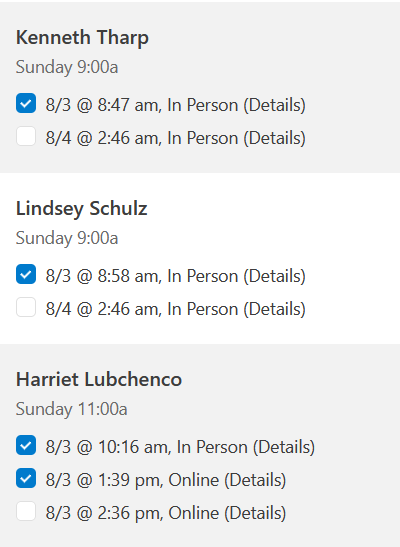
When deleting duplicate check-ins, make sure to keep the oldest check-in as the original. This should look like this:
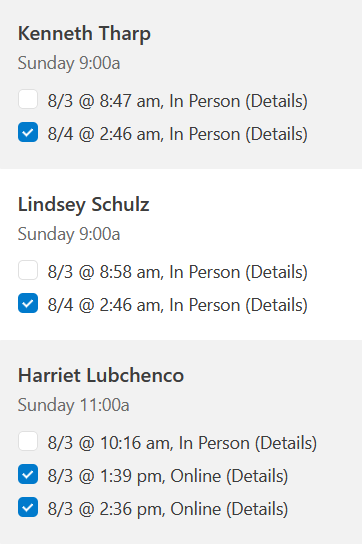
Adjusting Online/In-Person Check-ins
In addition to checking in more than once, congregants will often check into the wrong location. This looks like checking in online while actually being in person. Noticing the difference here is simple.
Folks who have accidentally checked-in online are fairly easy to recognize. A single check-in in the list view looks like this:

We can see that Lisa has been checked in online by an automation. Because of this, we know that Lisa did attend online because the use of an automation indicates that she used our online check-in form which our system used to check her in. We do not need to adjust her check-in.
Other check-ins require a closer look. Below, we can see that Cindy has checked herself in online.

We cannot tell whether or not Cindy has checked in correctly from this view so we have to click on the check in. This will take us to a secondary check-in page with more information about Cindy's check in. Through doing this, the first thing we would see at the top of the page is:
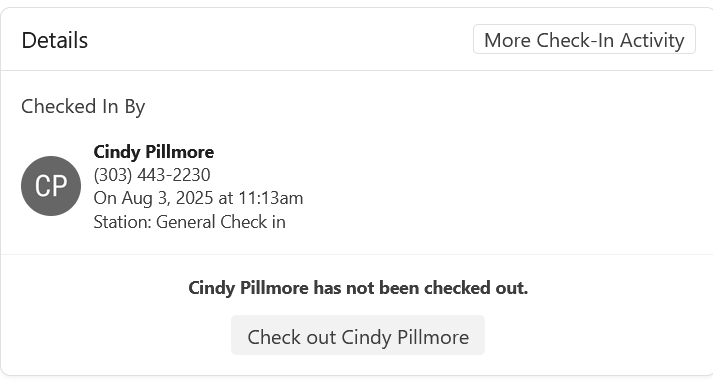
In this more detailed view, we can see that Cindy checked in through one of our Foothills' check-in tablets. Each tablet has it's own station name. The names of each tablet are as follows:
- General Check in
- General check in A
- General Check in 2
- Check in 2
- Check-in 2
- FM1 Tablet
- FM2 Tablet
- Family Ministry Tablet 3
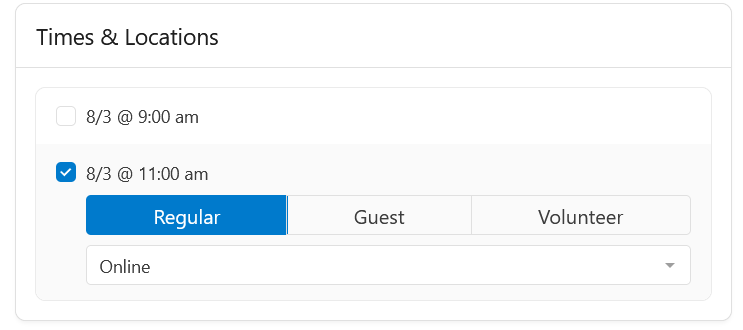
If you see someone has checked in using any of these stations, that means they were physically here at church and you will need to adjust their check-in. To do this, scroll down on the page of their detailed check-in information to the section which says "Times & Locations". Use the drop down selection to modify their check-in from "online" to "In-person".
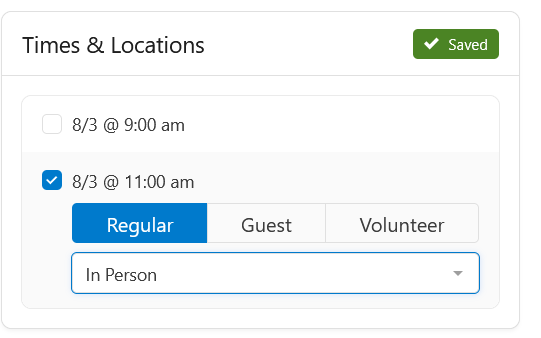
When folks have checked themselves in (online or in-person) without using one of our stations, this means they have checked-in through a personal device. This will be identifiable in the detailed page for a check-in and looks like this:
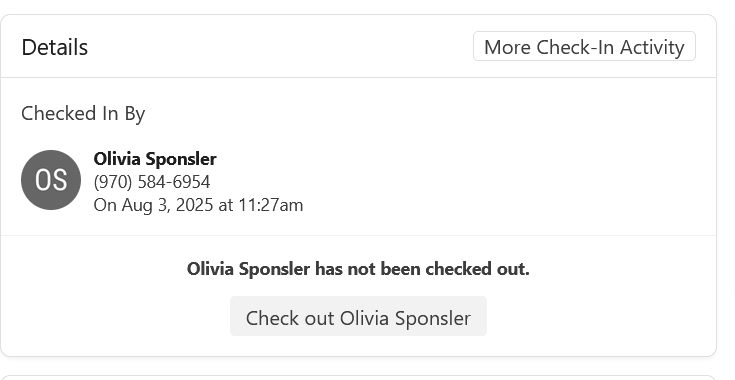
We can see here that Olivia's check-in has no Station or Automation attached, meaning they checked-in using a personal device. There is no way for us to validate whether or not this is correct, so you can just leave check-ins like this as they are.
Adding Online Check-Ins
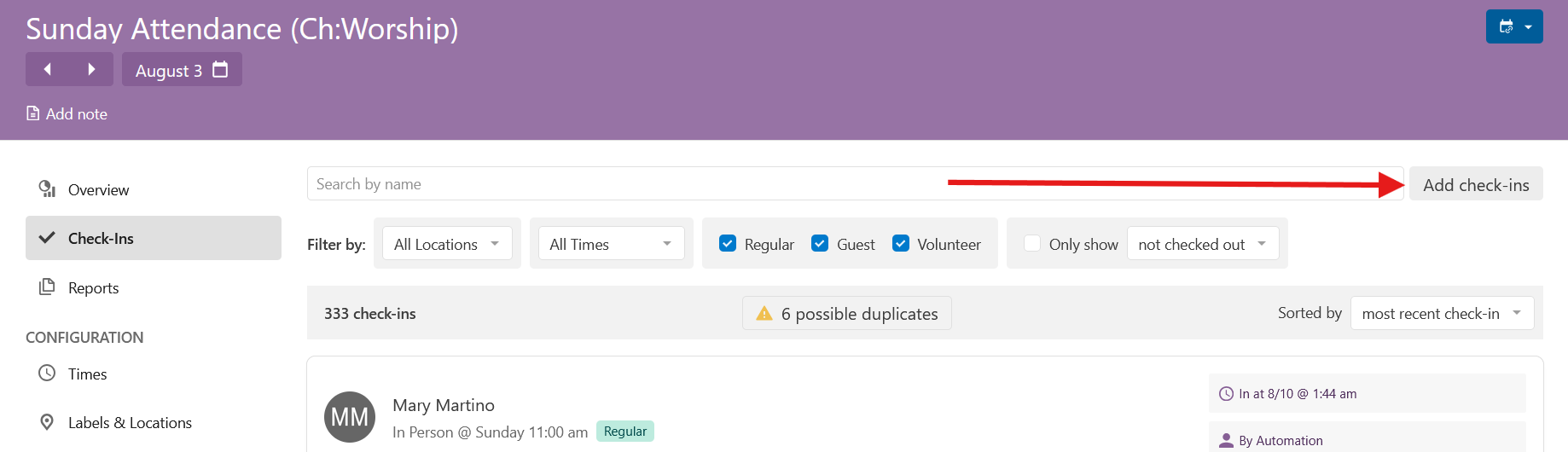
The admin team will export the most recent Sunday's Zoom attendance for you to use to add these check-ins to our general numbers. To add new check-ins, click on the "Add check-ins" button on the right side of the check-in list page
This will open a new pop up window which looks like the following:
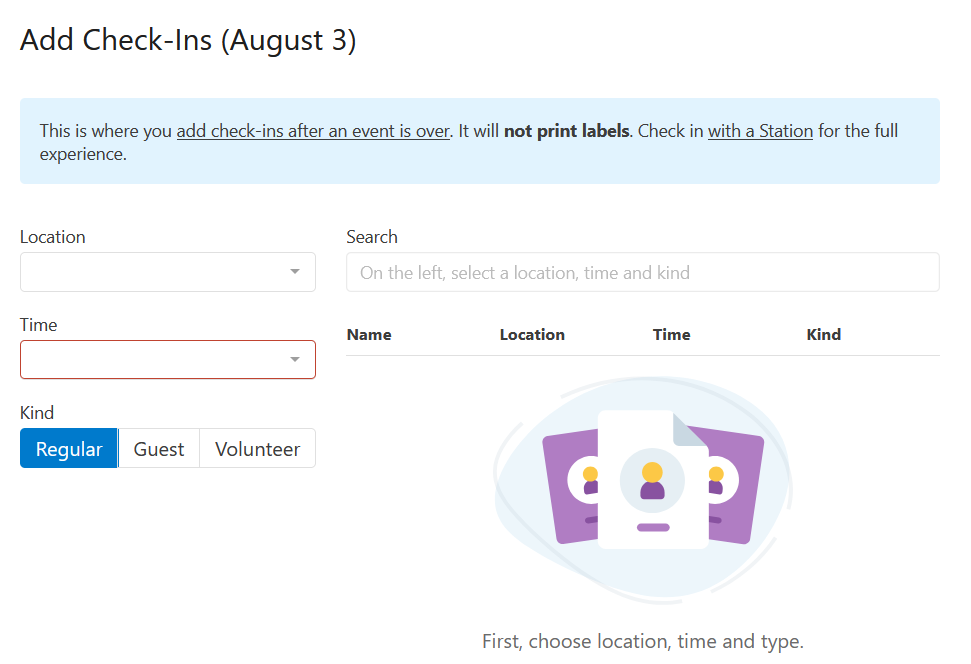
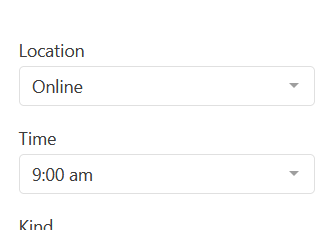
You will not be able to add any check-ins before setting a location and time using the drop downs on the left. Set these to "online" and "9:00am" respectively.
To add a new check in use the list you have been given by staff. You do not have to type in a person's whole name in order to bring up their profile, but only the first few letters of their first and last name. 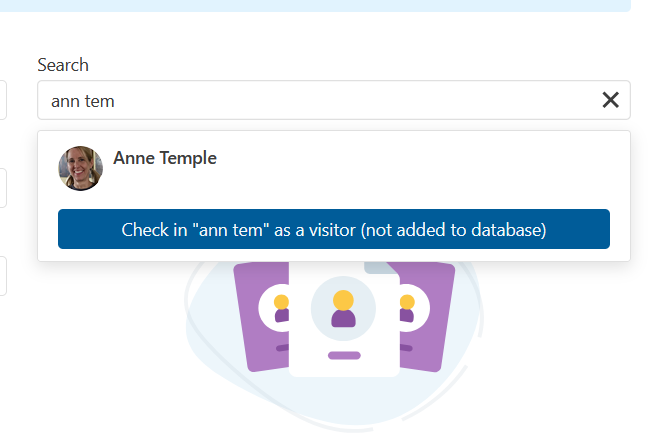
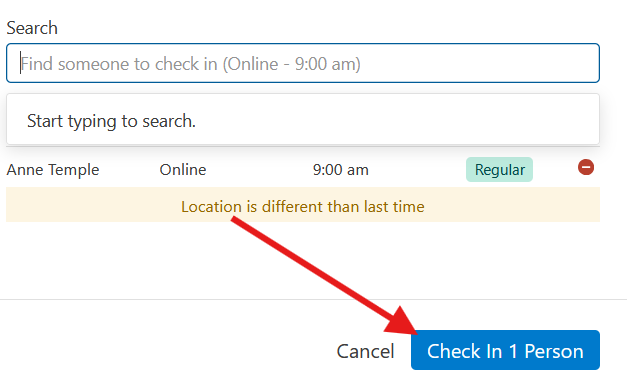
Once you have found the person you are looking for, click on them to add them to your check-in list. Continue adding the rest of the names on your Zoom Check-in list. When done, click the "Check In X Person(s)" button at the bottom of the pop up screen.
Children's Circle Groups
As part of kids' groups, leaders take down attendance on paper for parent check-out after class ends each Sunday. Often, parents will attend with their kids but not check themselves and/or their kids into Sunday Attendance. This makes our check-in numbers lower than they should be and will need to be adjusted.
Community Care: Fierce Together Assistance
Part of our work at Foothills means helping members of our community who have trauma with being in a religious setting. To help with this, we have a process for giving these folks assistance while minimizing any stress they feel about being in a church.
In the second brown drawer at the reception desk, we keep Fierce Together envelopes to give to folks in need. This is not something which we publicize as we only want folks in need of this assitance to ask for it. Because of this privacy, we can simply this process for these folks.
You will be able to identify these situations by a request for a "Fierce Together Envelope". If someone asks you for one, all you need do is give it to them, no questions asked. They will only know about it if we have previously told them. In addition, because this is care for folks with religious trauma, once you hear those words "Fierce Together", do not engage in any religious language or talk. We ask this as a way for these folks to feel comfortable in our space and to make it easier in the future to ask for our help.
No comments to display
No comments to display