
Lawn Sprinkler System
Lawn Sprinkler System
How to temporarily shut off and restart the church lawn sprinkler system
Vendor information
|
Vendor/Company |
Hurr Vasa |
|
Primary Contact |
|
|
Phone |
(970) 613-0225 |
|
|
irrigationmanager@hurrvasa.com |
|
Support Website |
https://www.hurrcolorado.com/ |
|
Account Number |
Not on file |
For any irrigation maintenance issue beyond turning the system off and on, contact Hurr Vasa directly using the information above.
Step-by-step instructions
Step 1: Locate the control panel
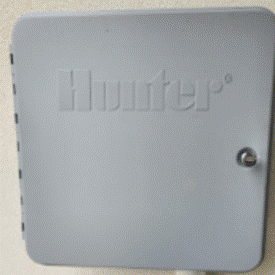
The sprinkler system control panel is located outside, on the West side of the building near the main entrance doors. It is a gray Hunter cabinet with a locking door, as shown below.
Step 2: Open the panel door
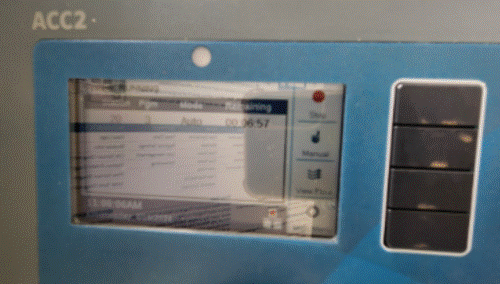
Open the control panel door. You should see a screen similar to the one shown below — this is the Hunter ACC2 controller, and this screen means the system is actively running on its normal schedule.
Step 3: Turn off the sprinklers
To turn off the sprinklers:
• Press the top black button, located to the right of the Stop sign.
• Press the bottom black button, located next to System Off.
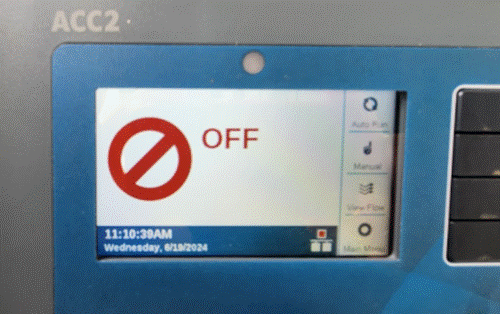
Once the system is off, the screen will look like the image below — a red circle-slash icon and the word OFF.
Step 4: Turn the system back on
To turn the system back on, press the button next to Auto Run.
Watering schedule reference
This is the standard watering schedule programmed into the system. It is provided for reference only — you do not need to change these settings to temporarily shut off the sprinklers.
• Established turf: runs 12:00 AM – 2:30 AM daily, plus an additional cycle from 3:00 AM – 5:30 AM on Wednesday, Friday, and Saturday.
• Seed program: 5 start times daily (7:30 AM, 12:00 PM, 4:30 PM, 7:30 PM, and 11:00 PM), running 1 hour 36 minutes per cycle, every day of the week.
• Drip program: 2 start times (10:45 AM and 4:30 PM), running 1 hour 30 minutes per cycle on Monday, Wednesday, Friday, and Sunday.
Troubleshooting
Problem: The screen is blank or unresponsive
Fix: Check that the panel is receiving power. If the screen remains blank, contact Hurr Vasa for support.
Problem: Sprinklers continue running after following the shut-off steps
Fix: Confirm that both buttons in Step 3 were pressed in order (top button first, then System Off). If sprinklers are still running after a few minutes, contact Hurr Vasa.
Problem: You forgot to turn the system back on and the lawn is not being watered
Fix: Return to the control panel and press the button next to Auto Run, as described in Step 4.
Problem: You need a maintenance issue addressed, not just a temporary shut-off
Fix: This guide only covers turning the system off and on. For repairs or other maintenance, contact Hurr Vasa using the information in the Vendor information table above.
FAQs
How long can I safely leave the system off?
There is no set limit, but remember to turn the system back on (Step 4) so the lawn continues to receive its regular watering schedule.
Where exactly is the control panel located?
Outside, on the West side of the building near the main entrance doors.
Who do I contact for repairs or other irrigation issues?
Contact Hurr Vasa at (970) 613-0225 or irrigationmanager@hurrvasa.com. See the Vendor information table above for full details.
What is the current watering schedule?
See the Watering schedule reference section above for the established turf, seed, and drip program times.