
Fire Alarm Panel Guide
Foothills Unitarian Church | Facilities | Last updated: June 2026
Overview
Foothills Unitarian Church uses a Honeywell E3 fire alarm control panel. This guide explains the system layout, how to respond to an alarm, how to silence the panel, and how to coordinate with our fire safety vendor and monitoring company.
System Components & Locations
Fire Alarm Control Panel
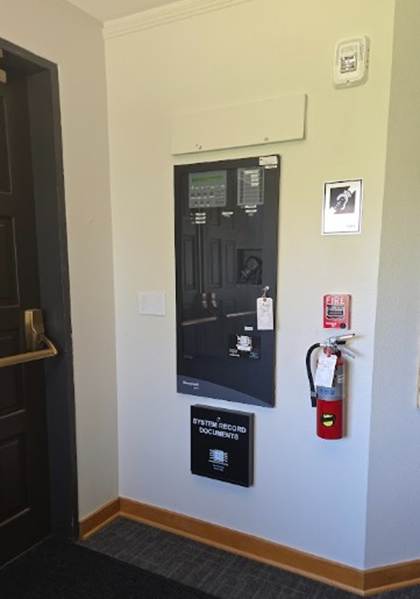
• Location: Admin Lobby, to the left as you enter through the wooden doors
• Make/Model: Honeywell E3
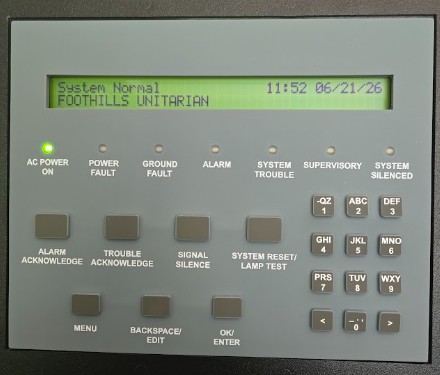
• The panel displays system status ("System Normal"), time, and date at all times
• A System Record Documents box is mounted below the panel
• A strobe/horn is mounted above the panel
• One fire extinguisher is mounted on the wall to the right of the panel
Monitoring Communication Hardware
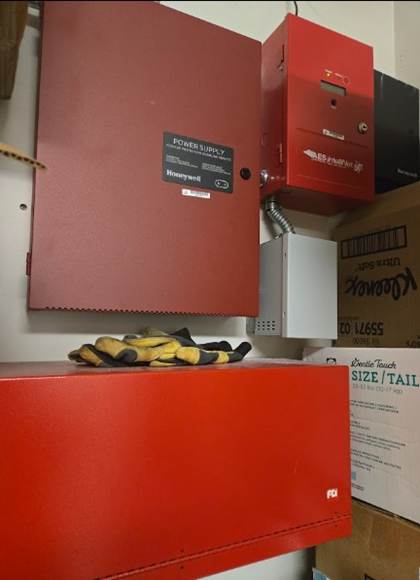
• Location: Cleaning closet next to the kitchen
• Includes a Honeywell Power Supply unit and AES IntelliNet cellular communicator
• This hardware contacts the monitoring company automatically when an alarm is triggered
Riser Room (Sprinkler System)
• Location: Chalice Wing Basement, across from the elevator
• Contains the sprinkler system risers and backflow devices
Fire Extinguishers
• There are 12 fire extinguishers located throughout the building
• One is located in the Admin Lobby next to the fire alarm panel
• All extinguishers are inspected annually in February
Monitoring Company
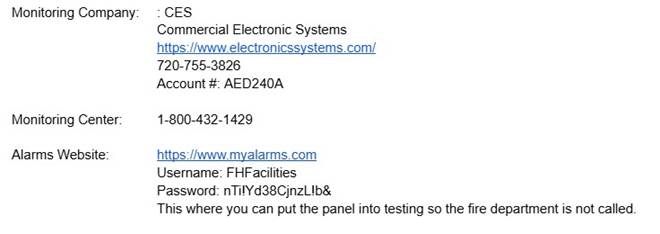
CES – Commercial Electronic Systems
Website: www.electronicssystems.com
• Phone: 720-755-3826
• Account #: AED240A
• Monitoring Center (24/7): 1-800-432-1429
For actual fires or serious alarms, the monitoring center will automatically dispatch the fire department and then call the contacts below in order until someone answers. Each person must provide their password to acknowledge the alarm.
Alarm Notification Call List:
1. Holly Ayala – Facilities Coordinator – 970-342-1118 – Password: 7469
2. Katie Watkins – Director of Operations and Finance – 970-658-6728 – Password: 2410
3. Jenn Powell – Event and Operations Manager – 970-829-1068 – Password: 2020
If the first person does not answer, the monitoring center will call the next person on the list until someone responds.
Alarms Website (myalarms.com): Use this to put the system into test mode so the fire department is NOT dispatched during planned testing or inspections.
• Website: myalarms.com
• Username: FHFacilities
• Password: stored in Dashlane
Fire Safety Vendor – National Fire and Safety
Website: www.natfiresafety.com
NFS handles all annual inspections and service calls under a 2-year contract (through end of 2028).
Key Contacts:
• Todd Harrison – Sales/Account Rep: c. 720-428-9534 | tharrison@frontierfireprotection.com
• Alex DePesa – Service Coordinator: (303) 629-0221 ext 106 | direct: (303) 285-2050 | adepesa@natfiresafety.com
• Natalie Mondragon – Service Coordinator: (303) 629-0221 x 127
Inspection Schedule:
• February – Annual fire alarm, sprinkler, and fire extinguisher inspections
• June – Annual backflow inspections (reports submitted to the City of Fort Collins)
Service Calls:
• For any fire alarm or sprinkler issues, contact NFS directly
• Hourly service rates: $175/hr (fire alarm) | $235/hr (sprinkler)
Step-by-Step Instructions
Step 1: Check the Panel Status
The panel display shows the current system status at all times. Check this first before taking any action.
• "System Normal" – no action needed
• "Alarm" – follow the alarm response steps below
• "Trouble" – contact NFS for service
• "Supervisory" – contact NFS for service
Step 2: Responding to an Alarm
If the alarm sounds:
4. Call 911 immediately if there is any sign of fire or smoke.
5. Evacuate the building following posted evacuation routes.
6. Go to the fire alarm panel in the Admin Lobby.
7. Press Alarm Acknowledge to silence the notification and identify the alarm zone on the display.
8. Press Signal Silence to stop the audible alarm while you investigate.
9. Once the situation is confirmed safe and the cause is resolved, press System Reset / Lamp Test to restore the system to normal.
10. Call the CES Monitoring Center at 1-800-432-1429 to confirm the alarm status and advise whether a fire department response is needed.
Step 3: Before a Scheduled Inspection or Test
To prevent the fire department from being dispatched during a planned inspection:
11. Log in to myalarms.com with username FHFacilities (password in Dashlane).
12. Put the system into test mode.
13. Notify NFS that the system is in test mode and they may proceed.
14. When the inspection is complete, take the system out of test mode on myalarms.com.
15. Confirm with NFS that all systems are restored to normal.
Step 4: Making a Building-Wide Announcement
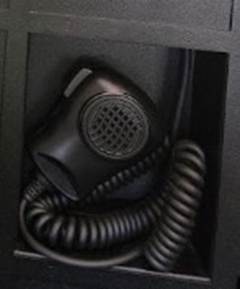
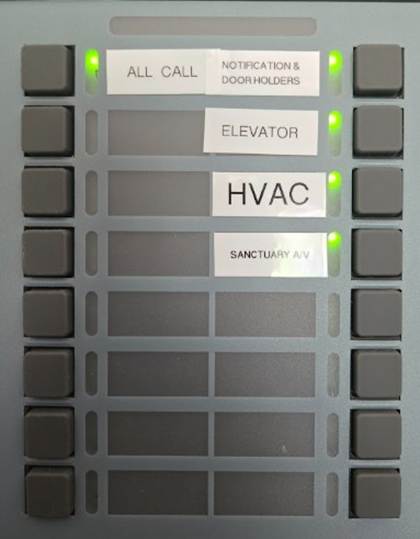
The fire panel includes a PA system with zone control buttons and a handset microphone.
16. Locate the handset inside the panel (lower compartment).
17. Press the zone button for the area you want to reach (All Call, HVAC, Elevator, Sanctuary A/V, etc.).
18. Speak clearly into the handset.
Troubleshooting
Problem: Panel shows "Trouble" but no alarm is sounding
Fix: Do not attempt to clear a Trouble condition yourself. Contact NFS at (303) 629-0221 to schedule a service call.
Problem: Alarm triggered accidentally (no fire or smoke)
Fix: Press Alarm Acknowledge, then Signal Silence. Call the CES Monitoring Center at 1-800-432-1429 to advise it was a false alarm. Press System Reset to restore the panel. If the fire department was already dispatched, meet them at the entrance and explain the situation.
Problem: Panel will not reset after an alarm
Fix: The underlying alarm condition must be cleared before the panel will reset. Ensure all doors, pull stations, and smoke detectors are back to normal. If the panel still will not reset, call NFS.
Problem: Fire department was called during a planned inspection
Fix: Meet them at the entrance and explain that a scheduled inspection was in progress. In the future, log in to myalarms.com before any inspection to place the system in test mode.
Problem: AES communicator in the cleaning closet has a fault light
Fix: Contact CES at 720-755-3826 (Account #AED240A) to report the issue. Also notify NFS so they are aware monitoring may be impaired.
FAQs
Q: Who do I call first in a real fire – 911 or the monitoring company?
Always call 911 first. The monitoring company will also be notified automatically by the AES communicator, but your first call should be to emergency services.
Q: What happens if I don’t answer when CES calls during an alarm?
The monitoring center will move on to the next person on the call list. If no one answers, they will rely on the fire department response. Make sure your password (7469 for Holly, 2410 for Katie, 2020 for Jenn) is memorized so you can quickly acknowledge the call.
Q: How often is the fire alarm system inspected?
The fire alarm, sprinkler, and fire extinguishers are inspected annually every February. Backflow devices are inspected annually every June. All inspections are handled by National Fire and Safety.
Q: What is the System Record Documents box below the panel?
It contains the official inspection reports and system documentation required to be kept on site for the local Authority Having Jurisdiction (AHJ). Do not remove documents from this box.
Q: Can staff silence or reset the panel themselves?
Yes, staff can acknowledge and silence the alarm using the panel buttons. Always call the CES Monitoring Center after silencing to confirm the system status. If the situation is unclear or the panel cannot be reset, call NFS for service.
Q: What zones does the PA system cover?
Q: What if we need to add or change a fire extinguisher location?
Contact NFS at (303) 629-0221. They handle all fire extinguisher service and placement under the maintenance contract.