Using Guide
Intro to Guide
Why We Created Guide.Foothillsuu.org
Welcome to Guide.Foothillsuu.org, an internal documentation platform designed to centralize and streamline all documentation within Foothills from our governance policies to our processes, procedures, and resources.
This platform is built on the open-source platform called Bookstack, offering an organized, accessible structure for the various documentation needs of our staff, volunteers, and community members.
How To Use Guide
The video below gives you a good orientation to the platform and how it can support our goals for comprehensive, clear, and collaborative documentation.
Documentation Structure
Our documentation system is organized into Shelves, Books, Chapters, and Pages, which allow us to categorize and structure information logically and accessibly. Here’s an overview of the structure:
- Shelves group similar topics together, creating a high-level organization of content. Each shelf holds multiple books that fall under a particular category.
- Books contain more specific areas of documentation, such as Ministry Handbooks or Governance resources.
- Chapters break down each book into manageable sections.
- Pages within each chapter contain the detailed information, such as procedures, how-to guides, or specific policies.
This hierarchical structure ensures that staff and community members can easily find what they need. Staff can create pages within appropriate books to centralize procedures for their areas of responsibility. If you are unsure where something should go, please contact your supervisor for guidance.
We are still in the process of exploring what the best structure is for all content, so this will be an emergent system as we refine and adapt it to our needs.
Gaining Access to Guide
- Go To https://211134-bookstack.peaknetworks.cloud/
- Click Sign Up on the top nav menu
- Sign up with your work email address
- Contact Sean or Katie to be given permission to edit
Creating and Updating Pages
If you are responsible for creating or updating content, the following guidelines will help:
-
Identify the Correct Book: Begin by finding the appropriate book or shelf that fits the content you are creating. If you’re unsure, consult with your supervisor.
-
Add Your Page/Chapter: Once you’ve located the correct place, you can create a page that outlines a procedure, how-to guide, or any other necessary documentation.
-
Continual Updates: As procedures and policies evolve, ensure that the documentation is kept up-to-date to reflect any changes. We are continuously refining the structure, so feel free to reach out if something doesn’t seem to fit, and we’ll work together to find the best placement.
Thank you for contributing to this collaborative documentation effort as we continue to make our systems more efficient and accessible for all at Foothills Unitarian Church!
Referencing Other Guide Pages
When building content in Guide.Foothills, it's essential to make connections between related pages to create a cohesive and easy-to-navigate system. One of the powerful features of Bookstack is its ability to display linked pages in the sidebar menu, allowing users to easily move between related documentation.
Here’s how and why to add links between pages:
Why Link Pages?
- Provide Context: Linking a procedure to the policy it implements helps users understand the rationale behind specific actions and ensures alignment with the church’s strategic goals.
- Ensure Continuity: Linking related content ensures that staff can quickly find the supporting documents they need without having to search for them separately.
- Encourage Cross-Reference: The more interconnected the documentation, the easier it becomes for staff and community members to find relevant information quickly and efficiently.
How to Add a Link to Another Page
-
Edit the Page: While editing the page, select the text that you want to turn into a link.
-
Insert the Link: Click the "Insert Link" button in the toolbar. You can then search for the page you want to link to by title or select it from the dropdown menu.
-
Save the Changes: Once you've inserted the link and confirmed it, save your page.
Sidebar Links
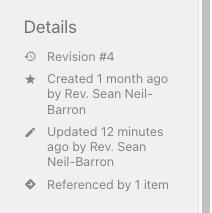 Once you’ve added a link to another page, Bookstack will automatically display that link in the sidebar. This feature is especially useful for navigating between multiple levels of documentation, such as policies, procedures, and processes.
Best Practices for Linking
- Link Organizational Guidance to Policies: Whenever you’re writing a procedure, include a link to the policy that it is implementing. This not only reinforces the connection but also makes it easier for users to see the bigger picture.
- Link How-To Guides to SOP: When creating a how-to guide, link it to any relevant procedures to provide context on why certain steps are necessary.
- Use Descriptive Link Text: Ensure the text you turn into a link is clear and descriptive. For example, instead of writing "click here," use “View the [Policy on Event Reservations].”
By doing this as much as possible, you’ll ensure that the entire documentation system feels cohesive and intuitive, helping our community work more effectively.
Glossary
ADA: Americans with Disabilities Act — sets accessibility and non-discrimination standards.
Archiving: Storing selected church documents for long-term preservation and historical use.
BOT: Board of Trustees, the governing body of the church.
Bookstack: open source platform that Guide.foothillsuu.org is build with
BaseCamp: class orienting foothills members to basecamp, a requirement for membership
Caretaker: The designated person responsible for opening, closing, and monitoring the building during events.
Clearstream: Our SMS / Texting Software
Checkr: Our background check system
Covenantal: A way of being in community based on mutual promises and spiritual accountability.
DFM: Director of Family Ministry — staff leader for programs supporting family spiritual life.
DFO: Director of Finance and Operations — oversees church finances, HR, and building systems.
DRE: Director of Religious Education — staff leader for children’s RE programs.
Executive-Team: The staff team comprised of the Senior Minster, Director of Finance and Operations, and the Associate Minister.
Exempt: A legal employment classification that excludes an employee from overtime pay under FLSA.
FLSA: Fair Labor Standards Act — federal law that defines exempt/non-exempt employee status.
Grievance: A formal report of a violation of church policy or covenant.
Handbook: is a curated collection of Organizational Guidances focused on a specific area of church life or ministry.
Inquirers: Newcomer class covering Foothills basics
LAA: Limited Access Agreement — a formal plan outlining boundaries and permissions for individuals with known safety concerns.
Mandate: Legal duty to report suspected abuse (e.g. ministers and DFM are mandated reporters).
Misconduct: A violation of congregational ethics, safety, or behavioral agreements.
Mailchimp: Foothills email newsletter platform
Nepotism: Favoritism toward relatives in hiring or leadership — restricted in church policies.
Nonexempt: A legal employment classification that requires overtime pay under FLSA.
OWL: Our Whole Lives — UU sexuality education curriculum grounded in values and consent.
PCO: Planning Center Online, our database.
Parishioner: A member or regular attendee of the church community (less common in UU usage but may appear).
Quorum: The minimum number of members required to be present for a vote or meeting to be valid.
RE: Religious Education — programs supporting spiritual growth for children and youth.
RSS: Real Simple Syndication
Retention: The specific time period documents or records must be kept before disposal.
Sanctioned: Officially approved (often used for events or programs formally supported by church leadership).
SOP: Standard Operating Procedure
Screened: A person who has completed background checks and training for working with children or vulnerable adults.
UYRB: Unpacking Your Religious Baggage
UUA: Unitarian Universalist Association — national network and support body for UU congregations.
YRUU: Young Religious Unitarian Universalists — high school youth group focused on UU identity and leadership.
Audio Visual Glossary
ATEM: A hardware switcher made by Blackmagic that manages video input and output for livestream and Zoom.
Birddog: The joystick controller used to pan, tilt, and zoom PTZ cameras.
Companion: Software that programs the StreamDeck buttons for automation and control.
Encoder: Hardware or software that converts live video into a digital stream for broadcasting.
HDMI: High-Definition Multimedia Interface — a cable and port type used to connect video and audio between devices.
ISO: In ATEM context, refers to isolated recordings of each input during a livestream.
Macro: A pre-programmed command that automates screen content and display cues in ProPresenter.
Matrix: A digital mixer setting that combines multiple audio mixes into a single output stream.
NDI: Network Device Interface — allows video and audio to be shared over a network, used with PTZ cameras.
Overlays: Visual elements such as lyrics or name slides added on top of video in ProPresenter.
ProPresenter: The main software used to run visual presentations (slides, lyrics, backgrounds).
QSYS: Audio-visual routing and control system accessed via iPad for the sanctuary setup.
Reflow: A mode in ProPresenter used for editing and organizing lyrics into slides.
Scene: A saved preset in the SQ5 mixer that recalls specific audio settings for events (e.g. HybridMeeting).
Slide: A single visual element used in a presentation; can contain text, media, or backgrounds.
SQ5: The digital audio mixer used to control sound for sanctuary, livestream, Zoom, and overflow.
StreamDeck: A customizable keypad used to switch camera angles or trigger presets with a single press.
USB-C: Cable/port format used for sending video to Zoom and recording to hard drives.
WaveCast: The hearing assist system that streams service audio to mobile phones.
Zoom: Video conferencing tool used for hybrid services — receives camera and audio via ATEM.
Bookstack Tags
1. Status
Track the stage of a document’s development or readiness.
Status: In ProcessStatus: CompleteStatus: Review Needed
2. Congregational Life
-
Worship: Zoom -
Worship: Livestream -
Worship: Onsite -
AV: Slides
3. Platforms
MailchimpGoogle DriveZoomProPresenterMake.comChurch Metrics
Bookstack
Bookstack: Template
Websites
Website: GuideWebsite: DispatchesWebsite: Foothillsuu.org
Planning Center / PCO
PCO: GroupsPCO: PeoplePeople APP: NotesPeople APP: WorkflowsPeople APP: Forms
PCO: GivingPCO: CalendarPCO: PublishingPCO: Church CenterPCO: RegistrationsPCO: Check-insPCO: DirectoryPCO: Automation
Room Specific Tags
Room: [Name of Room]
Guide Canva Template
https://www.canva.com/design/DAGjnuV250k/OUHkfv5hs-WWk6_BEe7LxQ/edit?utm_content=DAGjnuV250k&utm_campaign=designshare&utm_medium=link2&utm_source=sharebutton