Church Events
- Events & Calendaring
- Guiding Principles for Events and Calendaring
- Event Requirements
- Event Naming Guidelines
- Event Tags
- Using Calendar Effectively
- Event Template Emails
- Event Templates
- Event Approval & Processing
- Facility Use Approval Process
- Rooms & Resources Approval Groups
- Procedure: Event Promo & Communication
- Procedure: Processing Calendar Forms
- Procedure: Event Administrative Activity Tracking
- Staff Scheduling
- Congregant Scheduling
- Event Childcare
- Event Procedures
- Canceling Church Programs and Services
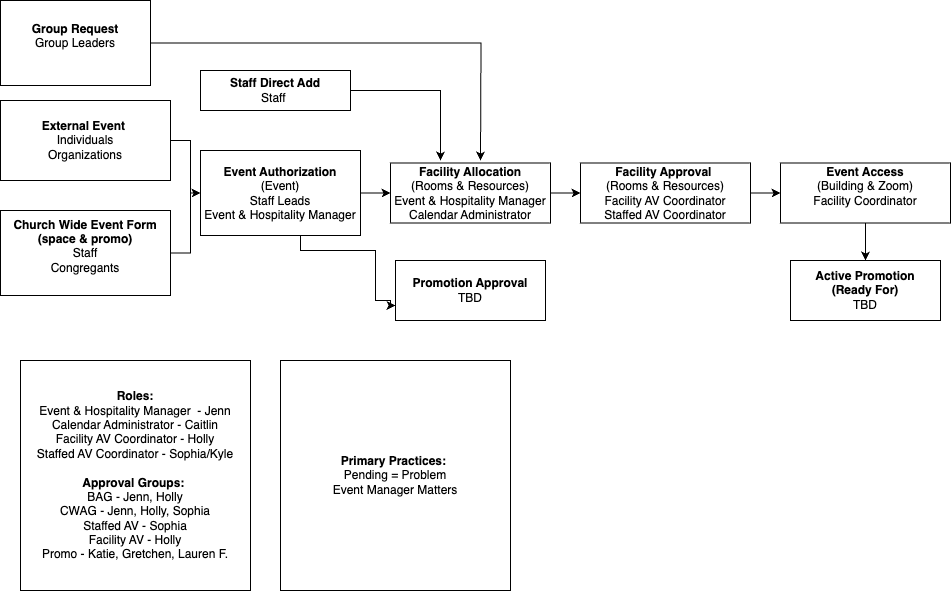
- Building Use Forms & Approvals Flow Chart
Events & Calendaring
Guiding Principles for Events and Calendaring
Foothills uses PCO Calendar (known from here on our as Calendar) as our only calendaring system. All church events irrespective of location (online, offsite, onsite, rental, staff or group) should be represented on Calendar.
Consult PCO Calendar Documentation for questions related to how to use Calendar. Access documentation via link: https://pcocalendar.zendesk.com/
Accessing the Calendar
- For Staff: All staff members have access to the Calendar, which encompasses all event details (https://calendar.planningcenteronline.com/events)
- For Lay Leaders and Community Members: Access to the Calendar is available through Church Center on the Foothills website (foothillsuu.org/events) or via the Church Center app. This view includes only public events labeled for visibility on Church Center.
- Additionally, Groups Leaders use PCO Groups to Manage Their Own Internal Calendars
Guiding Principles
To ensure effective and efficient event management and calendaring within our church community, the following principles have been established. These guidelines aim to provide clarity, accessibility, and a comprehensive understanding of all church-related events.
1. Calendar is the Hub
- Comprehensive Information: PCO Calendar (known as simply Calendar) is the central repository for all event-related information. It should contain detailed event descriptions, including the organizer, affiliated group, registration details, and location specifics. This ensures that all necessary information is readily available in one place.
- No External Searching Required: Individuals looking for event information should not have to consult multiple sources. The Calendar will serve as the definitive resource for all inquiries.
- This can include uploading relevant files related to the event.
2. ChurchCenter as the Public Events Calendar
- One-Stop Shop for Events: ChurchCenter, accessible via the website or app, is the public-facing calendar for all church events. It should reflect the most current promotional materials and event details.
- Visibility Criteria: While the majority of church events will be visible on ChurchCenter, certain events such as staff meetings will remain internal and not listed publicly.
3. Registration Pages
- Use for Key Events: Registration pages are utilized for featured events and church-wide initiatives. They serve as a means to manage attendance and provide detailed information to prospective attendees.
- Integration with Calendar: These pages should be directly linked to or created from the Calendar to ensure consistency and ease of access.
4. Calendar as the First Stop
- Initial Event Creation: The process of organizing an event begins with the Calendar. Upon creating an event, organizers can easily establish connections for check-ins, registration pages, and website publication through ChurchCenter.
- Efficiency in Planning: This principle ensures a streamlined approach to event planning, reducing the need for multiple steps and simplifying the promotion process.
5. Mandatory Attendance Tracking
- Importance of Attendance: Tracking attendance at all events, whether through groups or check-ins, is crucial. This helps in understanding community engagement and the reach of our programs.
- Community Insight: Attendance data provides valuable insights into participation trends, helping to guide future event planning and community outreach efforts.
6. Standardized Naming Practices
- Clarity and Consistency: Events should adhere to standardized naming conventions to ensure clarity and ease of identification. This includes clear descriptions, timeframes, and organizer information.
- Accessibility: Standardized names make it easier for community members to find and understand events, enhancing overall participation
Event Requirements
Every event entered into the Calendar must include the following mandatory information:
| Required Information | Description |
|---|---|
| Event Name (aka Public Facing Event Name) | Title of the event, suitable for public viewing. See: Event Naming Guidelines. |
| Event Owner (aka Staff Lead) | Designated primary contact for the event, who will receive communications. Must have Calendar permissions. |
| Date | Scheduled date(s) for the event. |
| Start Time / End Time | Commencement and conclusion times, including repetition details if applicable. |
| Repeat | Instructions if the event recurs. |
| Location | In-person or virtual location description, visible on the event listing and kiosks. |
| Summary | Brief overview of the event for public engagement, useful for iCal feeds or kiosk displays. |
| Church Center Visibility | Options to publish, feature, or keep the event unpublished on Church Center. see Events Visible on ChurchCenter. |
| Tags | Required selection from each group: Department, Event Type, Location. Details in the tags section. |
| Rooms & Resources | Details on rooms and resources allocated for the event. |
| Notes | Internal information, must include a point of contact for the event. For lay events this means: name, phone and email. |
| Connections | If the event is connected to a Group, A Worship Service, A Registration, it must be linked. Read more about connections. |
| Optional Information | Description |
|---|---|
| Setup Time / Teardown | Time allocated before and after the event for preparation and cleanup. |
| Event Managers | Additional staff members designated to receive updates about the event. |
For Events Visible on ChurchCenter
Events visible on ChurchCenter (referred to as "ChurchCenter events") must include the following additional information:
| Requirement | Description |
|---|---|
| Registration URL | Link to an internal or external registration page for the event. This could be a link to the PCO Group Event or a Registration page. |
| Description | Detailed, rich-text overview of the event for public viewing on Church Center. |
| Image | A representative image for the event to be displayed on Church Center. |
Event Naming Guidelines
- Clear and Descriptive: Use names that clearly describe the event or its purpose, ensuring it is understandable to someone not familiar with the specific group or activity.
- Avoid Abbreviations and Jargon
- Standardize Date and Time Format: For events occurring at specific times, include the day of the week and time, using a standard format (e.g., "Tues. 10am").
Formulas for Specific Event Types
Small Groups
This include Journey Groups, Gather Groups Wellspring groups and any small group that has more than one group connected.
Formula: Name of Small Group Type - Start Time (Leaders' Last Names)
ex. Journey Group - Tues. 10am (Leaders: Hazlitt & Miles)
ex. Wellspring Sources - Thursday 6:30pm (Leaders: Harder and Ferguson)
Note: When creating PCO Groups for small groups use the same naming convention.
This formula ensures that participants know the type of group, when it meets, and who leads it, providing all necessary information at a glance.
Memorials
- Formula: Memorial for [Name of the Deceased] or [Name of the Deceased]'s Celebration of Life
- Example: Memorial for Anna Jane Norris or Anna Jane Norris's Celebration of Life
Unless specifically instructed by the family avoid using the word Funeral.
Event Tags
Events highlighted in yellow are seemingly redundant and should be considered for removal.
Department Tags
| Tag | Description |
|---|---|
| Spiritual Practices* | Events focused on spiritual development and practices. |
| Serving & Justice* | Events centered around service and justice initiatives. |
| Small Groups* | Gatherings for small group discussions or activities. |
| Family Ministry* | Events designed for families and youth engagement. |
| Newcomers* | Welcoming events for new church members or visitors. |
| Spiritual Formation* | Educational and growth-oriented events for adults. |
| Worship* | Services and events focused on worship. |
| Music* | Events featuring musical performances or participation. |
| Governance & Board* | Meetings or events related to church governance. |
| Community Care & Support* | Support groups, counseling sessions, and similar gatherings. |
| Serving Teams* | Events or meetings for specific volunteer teams. |
| Staff Team | Internal events for church staff members. |
| Rites of Passage | Events marking significant life milestones (weddings, funerals). |
| Affinity & Connection | Events and gatherings that are primarily social or affinity based |
| Sexuality Education | For any Our Whole Lives groups or classes. |
| Rental | Private events hosted in the church's facilities. |
| Rental: Community Partner Event | Events hosted in partnership with a Foothills community partner. |
| Renter: Playcrafters | Events hosted by the Playcrafters group. |
| Renter: Center for Spiritual Living | Events hosted by the Center for Spiritual Living. |
Location Tags
| Tag | Description |
|---|---|
| Onsite* | Events held at the church's physical facilities. |
| Online* | Events conducted online. |
| Offsite | Events located away from the church premises. |
Set Up Tags
| Tag | Description |
| No Set Up Needed | Event can use room without any setup |
| Self-Set Up | Group will set up and take down for event |
| Staff Set Up | Staff will set up event |
Individual Tags
| Tag | Description |
|---|---|
| Memorial* | Events commemorating the life of a deceased individual. |
| Holidays* | Church or public holidays and observances. |
| Wellspring | Events related to the Wellspring spiritual program. |
| Journey Groups | Small group meetings for spiritual or personal growth. |
Using Calendar Effectively
Making "Connections" in Events
Each Planning Center product handles events differently. Events in Calendar can be connected to:
|
PRODUCT |
CONNECTION |
|---|---|
|
Groups |
An individual group |
|
Groups |
A specific group event* |
|
Registrations |
A signup |
|
Services |
The Service Type where the plan is located |
|
Check-Ins |
An event |
Connections do not sync. Any changes made in one app within PCO must be made in the connected products. Adding a connection to an event allows staff to easily see who is connected to an event, and see if there is anything missing from the event.
*The connection of a specific group event to a event in calendar occurs through the Calendar Forms.
Calendar Templates
To streamline the event creation process, Calendar Templates can be utilized to quickly apply rooms, resources, and tags to events, ensuring consistency and efficiency in event planning. Templates can be edited in Calendar: https://calendar.planningcenteronline.com/event_templates.
Review a list of Event Templates.
Event Template Emails
Event Templates
| Template Name | Variants / Rooms | Description / Setup | Resources |
| Offsite Event |
Event that takes place both not on Foothills campus or online |
||
| Online Event |
Event that takes place in a zoom room |
||
| Workshop or Meeting w/ Meal |
|
Workshop or meeting setup with people sitting at round tables seating under 36 people, with food.
Setup: Round tables with 6-8 chairs at each, table for supplies, table for a chalice |
chalice, led candle, small table for chalice, nametags, pens, whiteboard, TV cart with hookups, table for supplies, tea service, KN95 masks, hand sanitizer, tissues food ordered by staff |
| Large Meeting/Workshop |
|
Large meeting of 36-100 people, presented at the front of rows of chairs. |
chalice, led candle, small altar table, nametags, pens, whiteboard, TV cart with hookups or projection capability, table for supplies, water, tea service, KN95 masks, hand sanitizer, tissues Microphone/Speaker |
| Small Group Meeting (no Tech) |
|
Small group meeting room for 12 or less. No online participants or technology provided.
Setup: chairs in a circle with low round table in center, table for supplies |
chalice, led candle, nametags, pens, whiteboard , water, tea service, KN95 masks, hand sanitizer, tissues |
| Small Group Meeting (w/ Meeting Owl) |
|
Small group meeting room for 12 or less with meeting OWL for online participation.
Setup: chairs in a circle with low round table in center with meeting OWL, table for supplies |
chalice, led candle, nametags, pens, whiteboard , water, tea service, KN95 masks, hand sanitizer, tissues, meeting OWL, TV Cart. |
| Small Group Meeting (w/ TV Cart) |
|
Small group meeting room for 12 or less with TV Cart.
Setup: chairs in a circle with low round table in center with, table for supplies and TV cart |
chalice, led candle, nametags, pens, whiteboard , water, tea service, KN95 masks, hand sanitizer, tissues, TV Cart. |
| Children's Choir Rehearsal |
|
Setup: Chairs in rows, electric piano, music stand |
nametags, water, tea service, KN95 masks, hand sanitizer, tissues |
| Small Kids Workshop (Small OWL Group, True You) |
|
Flexible setup for ~16 people. Setup: Chairs in a circle with low table for chalice in the center, table for supplies |
chalice, led candle, small altar table, nametags, pens, whiteboard, TV cart with hookups, table for supplies, water, tea service, KN95 masks, hand sanitizer, tissues |
| Vespers Setup | |||
| Adult Choir Setup | |||
| Sunday Worship Setup |
Event Approval & Processing
Facility Use Approval Process
The Foothills Unitarian Church employs a structured approval process for the use of its facilities to ensure that all events align with our community values and logistical capacities. This process varies slightly depending on the origin of the request but is designed to be straightforward and efficient.
Approval Considerations and Entities
Depending on the event different approval considerations apply. The following diagrams and tables outline the approval considerations and the involved entities.

|
Approval Considerations |
Determined By |
||
|
Internal vs. External |
Internal - Foothills Internal Events |
External - Rentals & External Uses |
Facilities Approval Group |
| Authorized - Approved by correct approval entity |
Non-Authorized - Not approved by right approval entity |
Staff Lead / Shared Ministry Covenant | |
|
Regular vs "Church Wide" |
Regular - Events that don't need promotion | "Church Wide" - events that require or desire promotion |
Group Leaders/ Staff Leads |
|
Space Availability |
Space Available - Space is open & staff have capacity to manage event | Space Not-Available - Either space is not available or staff don't have capacity to manage event | Facilities Approval Group |
|
Approval Entities |
Role |
|
Facilities Approval Group |
|
|
Staff Lead |
|
|
|
|
Group Leaders |
|
Event Approval Sequence
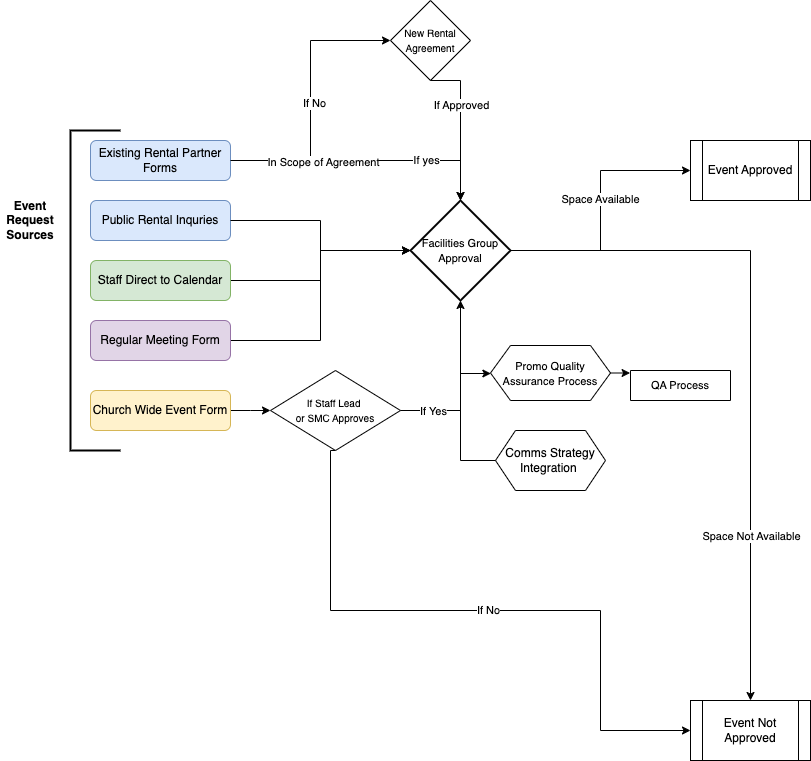
Step 1: Event Request Source(s)
-
- Staff Events: Staff members can submit events directly onto the calendar. These requests are routed to an appropriate approval group based on the specifics of the request.
- Regular Group Meetings (Group Leaders): Group Leaders request space through their groups using the Regular Group Meeting Space Request Form (Admin Link). This process ensures that recurring or one-time group events are accommodated within our church's schedule.
- Events with Promotion: Both group leaders and staff can use the Event with Promotion Form (Admin Link) for events requiring promotional efforts.
- Rental Partners: Specific forms are available for our rental partners, tailored to their unique needs and the terms of our partnership agreements.
- Public Rental Inquiries: The general public interested in renting our facilities can use the Public Rental Form. This ensures that all external requests are centralized and processed efficiently.
Step 2: Event Authorization
-
-
- Staff Events - No Additional Authorization before Facilities Approval Group
- Regular Group Meetings (Group Leaders)- No Additional Authorization before Facilities Approval Group
- Events with Promotion - Staff Lead or Shared Ministry Covenant Authorization
- Rental Partners - According to Scope of Rental Agreement
- Public Rental Inquiries- Alignment with Values
-
Step 3: Facilities Approval Group
- Queue for Approval: Event requests submitted via forms are placed in a queue awaiting review by an authorized member of the Facilities Approval Group. This ensures a systematic review of each request based on its nature and the church's capacity to host the event.
- Review and Approval: An authorized approver assesses the event request for alignment with church values, availability of space, and logistical feasibility. The approver has the authority to approve or deny the request based on these criteria.
Step 4: Promotional and Comms Strategy
- All events with promotion will trigger review of Communication team for Quality Assurance of ChurchCenter Presence and integration into Communication Strategy
- This includes determination if the event needs a Registration Signup.
Step 5: Coordination and Communication
-
-
Notification: Once a decision is made, an automatic notification is sent to the event requestor. This notification can be customized at the time of approval to include specific messages or instructions.
- Instructions for Facilities Staff will be added to the event and staff notified.
- Automation for Forms: For requests made through the Regular Group Meeting Space Request Form and the Event with Promotion Form, an automation is triggered, sending a templated email to the requestor once the form is filled out. This email outlines the next steps, providing clear guidance on what the requestor can expect following approval. Once it is approved, another automated email can be send. c.f Template Emails.
-
Rooms & Resources Approval Groups
What are Approval Groups?
Approval groups are groups of people who approve or reject booking requests for rooms and resources, as well as event requests from an event request form.
Approval groups need to have at least one person in them and each group can be attached to any number of rooms, resources, or event request forms.
Only one person from an approval group is required to approve a request.
Approval groups are managed in the Approval Groups tab on the People page.
How Approval Groups Function?
Room and Resource requests originate from two sources:
- Staff Members adding events directly to the Calendar
- When a Calendar Forms is filled out
Once the request is made, the members of the approval group are notified and they decided to approve or reject the use.
Our Approval Groups
| Approval Groups | Oversight | Who |
| Facilities | All Rooms and Resources | Jenn and Katie |
| Childcare | Childcare Staffing for Events | Lauren |
| Church Wide Event Promotion Group | All submissions to the church wide events and promo request | Katie, Jenn, Caitlin, Tatiana |
Remove Current Approval Groups: Religious Education has an approval group for Family Ministry Zooms not sure why.
Potential Future Approval Groups: AV Tech Booth, Playcrafters if they have oversight of their groups.
Procedure: Event Promo & Communication
ChurchCenter Event Quality Assurance
Church Center Event Standards
The Church Center Events Calendar serves as a centralized, accessible platform with the goal of enriching the Foothills Unitarian Church community by providing a comprehensive view of congregational life. It aims to:
-
Serve as a One-Stop Shop: Ensure all church members have a single, intuitive access point to discover events, understand their locations, and navigate directly to necessary sign-ups through registrations or group affiliations.
-
Maintain Accurate Information: Guarantee that the details of each event, including dates, times, and locations, are current and precise, fostering trust and reliability within the congregation.
-
Promote Inclusivity: Offer event information that is clear and welcoming to all, avoiding insider jargon or exclusive language that could alienate members new to the church or unfamiliar with specific groups or practices.
-
Highlight Featured Events: Identify and emphasize events that have a significant impact on a substantial portion (50% or more) of the church community or those directly related to ongoing worship series, ensuring these pivotal gatherings receive the attention and participation they deserve.
Event QA Steps
This checklist serves as a quality assurance tool for ensuring all Church Center events include essential information, adhere to event naming guidelines, and provide clear, accessible details to the congregation. Use this checklist before finalizing any event to maintain consistency, accuracy, and engagement.
Part of the Event QA is the transferring of content from the submitted forms to the Event.
See Processing Calendar Forms for step by step instructions on how to accomplish this data transfer.
Step 1: ChurchCenter Visibility Determination
Under the Settings Tab, in the Church Center Section, set the Church Center Visibility Status using the following criteria:
|
Visibility Status |
Impact on Display |
Criteria for Status |
|---|---|---|
|
Unpublished |
Not visible to congregants on Church Center. For internal use only. |
Use for internal events, staff meetings, rentals, or any activities not intended for the broader church community. |
|
Published |
Appears in chronological order on Church Center. |
Suitable for church events from specific groups and teams, that aim to inform and involve the congregation but are not prioritized. |
|
Featured |
Published, starred, and positioned at the top of the gallery view. |
Events that impact 50% or more of the church community or are directly related to a worship series. |
Step 2: Overview Tab
In the Event Overview Tab, insure all the details are set out correctly
-
Event Name: Follows the event naming guidelines; clear, descriptive, avoiding abbreviations and jargon. (see Below)
-
Location: Describes whether the event is in-person or virtual; includes specifics visible on listings and kiosks.
-
Tags: Includes selections from each required group: Department, Event Type, Location.
See Naming Conventions
- Clear and Descriptive: Use names that clearly describe the event or its purpose, ensuring it is understandable to someone not familiar with the specific group or activity.
- Avoid Abbreviations and Jargon
- Standardize Date and Time Format: For events occurring at specific times, include the day of the week and time, using a standard format (e.g., "Tues. 10am").
Formulas for Specific Event Types
Small Groups
This include Journey Groups, Gather Groups Wellspring groups and any small group that has more than one group connected.
Formula: Name of Small Group Type - Start Time (Leaders' Last Names)
ex. Journey Group - Tues. 10am (Leaders: Hazlitt & Miles)
ex. Wellspring Sources - Thursday 6:30pm (Leaders: Harder and Ferguson)
Note: When creating PCO Groups for small groups use the same naming convention.
This formula ensures that participants know the type of group, when it meets, and who leads it, providing all necessary information at a glance.
Memorials
- Formula: Memorial for [Name of the Deceased] or [Name of the Deceased]'s Celebration of Life
- Example: Memorial for Anna Jane Norris or Anna Jane Norris's Celebration of Life
Unless specifically instructed by the family avoid using the word Funeral.
Step 3: Settings Tab
Event Point of Contact Information
- Event Owner: Staff Lead of the Event or Lead for the Group Hosting Event
- Optional: Event Managers: If there are additional Staff involved in the Event
- Notes: This field should contain:
- Contact Information for the Event Point of contact (name, phone, email) for lay-led events
- Additional internal information for staff to know about the event
Event Descriptions
- Summary: Offers a concise overview for public engagement; suitable for iCal and kiosk display. One sentence max.
For Events Published or Featured on ChurchCenter
- Description: Detailed, rich-text overview for public viewing on Church Center.
- Registration URL: Provides a link to the registration page, whether internal or external.
- Image: Includes a representative image for display on Church Center.
Step 4: Connections Tab
|
PRODUCT |
CONNECTION |
|---|---|
|
Groups |
An individual group |
|
Groups |
A specific group event* |
|
Registrations |
A signup |
|
Services |
The Service Type where the plan is located |
|
Check-Ins |
A checkin event |
- Add Connections if the Event exists within other PCO Apps
- If needed create Signup In Registration
- If attendance is note being taken Groups, create checkin event
QA Process Automations
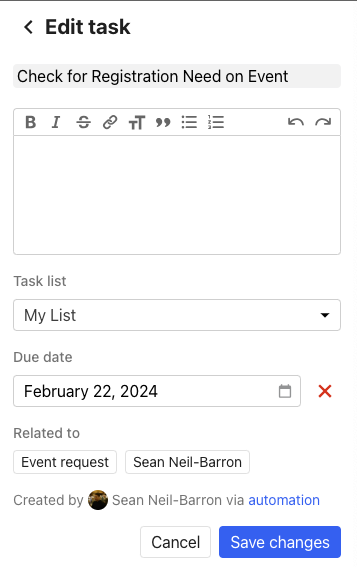
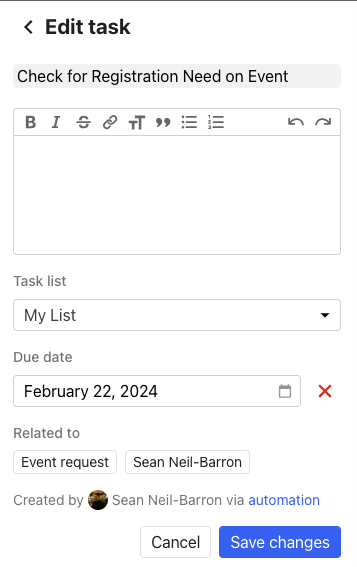
- Automation from Regular Group Meeting Space Request Form and Church Wide Events (Facility Use & Promotion Form) trigger a task to be created for the Admin Team Member in charge of QA for the ChurchCenter Events Calendar
- Task can be found in the "Home" Section of PCO or on on the PCO sidebar
- To Navigate to the Event that Created the Event Request, under "Related To" click Event Request.
Procedure: Processing Calendar Forms
This is for Foothills Staff not congregate facing
Church Wide Events (Facility Use & Promotion Form)
Until we figure out how to authorize iFrames see the PDF for the steps needed to process the information in a church wide event
Processing Church Wide Event Form.pdf
Regular Group Meeting Space Request Form
- Update Summary from Notes
- Add Contact Person
- Determine Church Center Visibility
- Update Event Managers
- Add Department Tag
Procedure: Event Administrative Activity Tracking
In order to track progress with the event approval and promotion process that is accessible to all admin staff, and able to be checked by other staff for status, we have created a Card Table in Base Camp to accompany all events. This will ensure that the admin team is aware of any events that are added, and can track all needed parts of the approval, setup and promo process. Specific activities can also be taken over by back up staff, if the primary staff responsible is out of office for any reason.
All staff have a responsibility to create a card for events they add to the calendar without a form. If you are using the Church-Wide promo form, the admin team will make the card for you.
Staff Direct to Calendar:
Step 1 (All Staff): Add event and all applicable details to the calendar.
Step 2 (All Staff): Create Event Specific Card from Template in Base Camp and link to Calendar Event.
Step 3: (Admin): Reviews Event Template Cards Daily
Public Rental, Regular Meeting, Church Wide Event:
Admin: Promo Form Received
Admin: Create Event Specific Card from Template in Base Camp
Admin: Update Assignments
Admin: Reviews Event Template Cards Daily
Admin: Move through Card Table Accordingly
Steps to Create an Event Specific Card:
1) Open the Event Approval & Promo Tracking Project in Base Camp
2) Open the Card Table
3) Open the Event Template from the Triage Step.
4) Click on the ellipses in the upper right hand corner, and select Copy.
5) From the Copy this Card Pop Up, click on "Select a Project" To open the drop down menu.
6) Select the first option, "Event Approval & Promo Tracking Card Table", then select "Copy to this new location".
You have now created your event-specific card.
1) Title your event accordingly.
2) Link to the calendar event you created.
3) Link to a canva design or any additional information that you need to include.
4) Save Changes
5) Return to the card table, and move your event into the "Approval" Step of the card table.
Admin team will now take over and ensure your event, event support, and promotion moves through our process.
Staff Scheduling
Congregant Scheduling
When a congregant has an idea for an event, fundraiser, group, etc, they should first visit https://foothillsuu.org/have-an-idea/ and complete "Step One: Assess the Sweet Spot."
If, after assessing the sweet spot, the congregant feels their idea is a good fit for Foothills, they should proceed to "Step Two: Fill Out the Making Something Happen Form." Once the congregant has submitted the Making Something Happen Form, we have 12 days to respond to them.
The Making Something Happen Form will go to the communications team. We will then review it and make sure all the information is as complete as possible before sending it to the appropriate staff lead for review.
The staff lead will then follow up with the congregant on the next steps, including letting them know if the event is not a good fit for the time/church or (if the event is a go) sending them the promotion request form.
Event Childcare
One person from the committee and/or the member who signs the contract sponsoring an event at the Church is responsible for ensuring all Childcare Procedures for Activities at Foothills Unitarian Church are followed and clean up is complete. Please review all child care procedures.
Event Childcare Overview
The Family Ministry Coordinator (Lauren Farley) is the staff lead for Childcare for Foothills-sponsored events.
Drop-in childcare will always be available without registration for all-congregation events.
Cf. Events with Automatically Provided Childcare
For other specific events we've decided to offer childcare for, our procedure is that childcare will be available with 48 hour advance registration.
This is important because we need to have enough time to find available childcare providers (we try to always have TWO providers, so if one person needs to go get a child's parent, no other children are left alone) and we need to manage our available budget for paying workers. Childcare may be cancelled if fewer than 2 children are registered or no childcare worker is available. We also need time to give participants adequate notice if childcare or the event itself will be cancelled.
Unsupervised children are not permitted at any event. If children are present and childcare staff are not, children need to remain in the event space with their parent/guardian/responsible adult and be directly supervised. Busy bags are available in the Welcome Kiosk in the entry hall and toys for young children are available in the Family Lounge for parent-supervised use.
We provide childcare free of charge to participants for events 2 hours and under. For events longer than 2 hours, please consider building in an option for a small donation (e.g. $5-10) to offset the cost of paying for workers and snacks and supplies for children.
If your event is offering food, be sure to consider that children in childcare will need an opportunity to eat as well, and be sure to gather information about food allergies/intolerances in registration.
Events sponsored by outside organizations/renters provide their own childcare and are responsible for adhering to Foothills policy and guidelines for safety and building use.
Events with Automatically Provided Childcare
At Foothills Unitarian Church, certain congregation-wide events automatically include childcare services to ensure all families can participate fully in our community life. These events are integral to our communal worship, decision-making, and celebration. The automatic provision of childcare for these gatherings reflects our commitment to inclusivity and support for families with young children.
Events with Automatic Childcare:
- Sunday Worship Services: Every Sunday, as a core part of our communal spiritual life, childcare is provided to allow parents and guardians to engage fully in worship.
- Congregational Meetings: Meetings that involve important decision-making processes, including votes that shape the future of our congregation, ensure that all members can participate without childcare concerns.
- Events Requiring a Congregational Vote: Any event specifically organized to facilitate congregational voting, recognizing the importance of every vote in guiding our church's direction.
- Special Congregation-Wide Celebrations: Key events in the church calendar that bring our community together for celebration, reflection, or commemoration.
Key Characteristics of Automatically Provided Childcare:
- Drop-In Availability: No prior registration is required for these events, offering flexibility and ease for families attending.
- Ensured Safety and Engagement: A minimum of two childcare providers are present to maintain safety standards and engage children in appropriate activities.
- Free of Charge: This service is provided free to participants, underscoring our commitment to accessibility for all church members.
This practice on automatically provided childcare for essential congregation-wide events ensures that Foothills Unitarian Church remains a welcoming, inclusive space for families of all shapes and sizes. By removing barriers to participation, we foster a more engaged and vibrant community.
Childcare Request Procedure
To streamline the process and clarify roles in managing childcare requests for Foothills-sponsored events, we've divided responsibilities between the event's Staff Lead and Lauren Farley, the Family Ministry Coordinator. Here’s how the tasks are split:
What the Staff Lead Does:
-
Assess Childcare Needs:
- Determine if the event qualifies for childcare (considering automatic childcare provision for congregation-wide events or if a separate request is needed).
- Decide based on event type and anticipated attendance if childcare is necessary and aligns with the 48-hour advance registration policy.
-
Submit Childcare Request Form:
- Complete and submit the childcare request form via Direct Form Link, providing details such as the event date, time, expected number of children, and any special requirements (e.g., allergies).
-
Communicate with Participants:
- Inform event participants of the childcare availability, including registration deadlines and policies regarding cancellation and unsupervised children.
- Ensure attendees are aware of any contributions suggested for events longer than 2 hours and communicate about food provisions for children.
-
Prepare for the Event:
- Coordinate with Lauren to ensure a designated area is prepared for childcare, considering safety and comfort.
- Arrange for busy bags and toys for children who stay with their parents in the event space, ensuring all materials are available and accessible.
What Family Ministry Coordinator Does:
-
Review and Approve Requests:
- Assess submitted childcare requests for completeness and feasibility, considering factors like event type, duration, and specific needs.
-
Coordinate Childcare Providers:
- Confirm the availability of at least two childcare providers for each event, adhering to safety policies and ensuring reliable care.
- Handle any necessary communications with childcare workers, including confirmations and cancellations.
-
Manage Logistics and Budget:
- Oversee the logistical arrangements for childcare spaces, ensuring they are safe, welcoming, and appropriately equipped.
- Monitor the childcare budget, taking into account the event's length, number of children registered, and any specific needs that might affect costs.
-
Follow-Up and Feedback:
- Collect feedback from parents and childcare providers post-event to evaluate the service and identify areas for improvement.
- Address any issues that arose during the event and make adjustments to policies and practices as needed.
By clearly delineating these responsibilities, Foothills Unitarian Church ensures a smooth and efficient process for providing childcare at church-sponsored events, supporting our families and upholding our values of inclusivity and community engagement.
Event Procedures
Opening and Closing the Facility
Admin. team is responsible for maintaining Opening and Closing procedures of the Campus.
Opening Facility procedures on Sundays:
- Staff Support arrives @7:00am and unlocks the Main Entrance Door, the other side should automatically open at 7am.
- Turn on Commons lights, Sanctuary main lights, and Admin. lobby and hallway lights
- By 7:30am Staff Support unlocks the East Parking lot
- Staff Support edits and prints by 7:45am the Today at Foothills Signs for both Sunday and Monday on tabloid size paper and inserts in the 3 exterior signs, and 1 interior standing sign by the Welcome Desk. Prints 2 small letter sizes for Volunteer Huddle in Conference room, and the Welcome desk. How to edit and print Today at Foothills is found HERE.
- Staff Support and/or Hospitality Volunteers open the shades in Unity Hall.
Closing Facility procedures on Sundays:
- If nothing is happening in the Commons area/Unity Hall or the Sanctuary, the Staff Support will turn off the Commons lights "ALL OFF" button. Otherwise they will keep those lights on.
- Staff Support will turn off the Kitchen lights, Admin. Lobby lights, Office lights
- Staff Support will close all shades in Unity Hall.
- Staff Support locks the Main Entrance Doors and East Entrance Doors before they leave @12:30pm.
Opening Facility procedures for Monday thru Friday:
- The first Admin. Staff who arrives to the building Mondays - Friday removes the previous day's Today at Foothills signs from the 3 exterior signs.
- Tuesday mornings, The Group Coordinator inserts Tuesday -Saturday Today At Foothills Signs in the 3 exterior signs and 1 interior signs.
- On Mondays, the office is technically closed. Lights only need to be turned on per the needs of the Admin. Staff person or others using the building.
- The Main Entrance doors remain locked unless a big event is taking place during the week, then the Admin. Staff person can unlock and lock accordingly. There will need to be a person affiliated with the event near the unlocked doors at all times for security.
- The Office entrance doors remain locked on Mondays.
- The Office entrance doors are unlocked when a volunteer or staff person is sitting at the reception desk only during Office hours Tuesday thru Thursdays. If no one is able to sit at the reception desk during those hours, then the Office entrance doors need to remain locked.
- On Fridays, the office is technically closed. Lights only need to be turned on per the needs of the Admin. Staff person or others using the building.
Closing Facility procedures during the week:
- If nothing is happening in the Commons area/Unity Hall or the Sanctuary, the Staff Support will turn off the Commons lights "ALL OFF" button. Otherwise they will keep those lights on.
- Staff Support will turn off the Kitchen lights, Admin. Lobby lights, Office lights
- Staff Support will close all shades in Unity Hall.
- Staff Support makes sure the Office Admin Doors, Main Entrance Doors and East Entrance Doors are locked before they leave OR knows who remaining in the building will be responsible to lock up before they go. If they are unaware of anyone else, then they are to lock up.
Other important Opening and Closing details:
- If there are a lot of leaves by either the Office Admin. Entrance or the Main Entrance, they need to be swept away. If the facilities Coordinator is not in that day, then we ask other Admin. Staff to remove the leaves with a rake or blower. Both can be found in the back closet off the admin. hallway.
- If there is snow on the sidewalks and driveway - we are contracted with Hurr Vasa to remove anything that is 2" or higher.
- Admin. who first arrives is asked to put salt on the sidewalks leading up to the main entrance, and to the street. Salt is found in the brown bins outside the Office Entrance and West Entrance, and next to East & West parking lot entrances to apply on the Yorktown sidewalks when we get a lot of ice.
Attendance and Check-ins
Newcomer and name tag sheets should be placed in Lauren K's mailbox following the 11am service
Zoom Checkins
Staff Participation and Event Fees Policy
Purpose:
To clarify expectations regarding staff participation in Foothills Unitarian events, including when payment of event fees or ticket costs is required.
General Principle
Staff are never required to pay to participate in Foothills events when their presence is part of their role as staff. Because staff are expected to “show up as staff,” even when not assigned an official duty, their participation is considered a work responsibility rather than a personal choice.
Ticketed Events
-
Staff Attendance: Staff do not need to purchase tickets for themselves for Foothills-sponsored events (e.g., fundraisers, concerts, programs) where their presence is expected or they are supporting the event in a staff capacity.
-
Guests and Spouses: Partners, spouses, or guests of staff who attend events should purchase their own tickets.
-
Optional Purchases: Staff may choose to purchase a ticket as an expression of support for the event. However, this is a personal and voluntary decision, not an expectation or requirement.
If a staff member purchased a ticket under the assumption that it was required, they may request a refund.
Participation in Limited or Resource-Intensive Events
Staff participation in Foothills events that have limited capacity (such as retreats, small groups, or ticketed programs) requires prior approval from their supervisor. Because staff covenantally agree to bring both their professional and personal selves to their work, they do not determine independently when they attend as a participant versus as staff.
Supervisors will evaluate:
-
Whether staff participation serves a programmatic or community purpose,
-
The potential impact on available space, resources, or participant experience, and
-
Any financial or operational implications.
Approval should be obtained before registration to ensure appropriate alignment with organizational priorities.
Communication and Clarity
Event organizers and staff leads are responsible for clarifying expectations that are in any way an exception to policy for staff attendance and costs well in advance of events to prevent confusion.
Canceling Church Programs and Services
Sunday worship or events may be canceled by the senior minister or staff person directly responsible for the event.
If a worship service or event is canceled due to weather or other emergency, notice will be posted on the website and congregants will be texted and/or emailed.
Building Use Forms & Approvals Flow Chart