Care and Support
- Pastoral Care Overview
- Community Care Fund
- Caring Network
- Support Groups
- Death and Memorial Procedures
- Sharing Joys and Sorrows with the Congregation
- Caring Listeners
- Caring Listener Role Description
- Caring Listener Recruitment Process
- Dispatching Caring Listeners: Reaching out on behalf of the Caring Network
- Procedure for Pairing Caring Listeners with Care Receivers
- Caring Listener Documents
- Supervision and Support of Caring Listener Team
- Caring Documentation
Pastoral Care Overview
Caring Triage and Delegation Process
1. Minister/Chaplain for Community Care learns that something has happened.
You may learn that someone is struggling or an event has happened in these ways:
- Prayers, Care, and Support Form on the website/church center
- A congregant tells you
- Someone tells you themselves
- Social media
2. Determine whether the event falls within the scope of what Foothills Caring Team handles
We offer pastoral care support to people who already have some involvement or relationship with the church.
If someone does not have a relationship with Foothills, use the template below to send them an email. It’s particularly geared towards requests for financial support from people in the community who are not connected with Foothills.
If you are unsure whether someone has had a relationship with Foothills before asking for support, reach out to Lauren Farley to gauge their connection to Foothills
3. Determine who reaches out
Caring Listeners are the default pastoral care providers at Foothills. To connect the person with a Caring Listener:
- Determine what part of town they live in (South, West, or the North/East part of town)
- Send a text to the two caring listeners in that geographic area with the following info. They will figure out between them who will reach out.
- A description of the situation
- email for care receiver
- phone number for care receiver
When the gravity or sensitivity of a situation merits pastoral care from a professional Carla will consult with Sean to determine who should reach out.
4. When minister or chaplain reaches out, try to offer these things:
- Prayer and Caring Corner: Would you like to be named in the next pastoral prayer and/or in the caring corner of the newsletter? (If so, make Active pastoral prayer note in PCO)
- Meal Train: Could we bring you some meals? We have team of people who love to cook and deliver meals. (If so, text or email Kay Williams and she will reach out to individual to get all the details and create a meal train)
- Caring Kit: Could you drop off a caring kit on your doorstep? We would love to. This is a gift bag with items of comfort and ritual. (If so, text Jen Wallen and tell her the name and circumstances of the recipient. Then, add this to the Caring Kit Workflow. Create a Caring Kit Note in PCO that says the circumstances for the kit)
- Community Care Fund: Would financial support be helpful? We have a Community Care Fund from which we offer disbursements once a year to community members who are in a financial pinch (If so, ping or text Rev. Sean and he will handle it)
- Notifying Others: Is there anyone else in the community you’d like us to notify?
5. Document in Caring Notes (kind of like charting).
After Minister or Chaplain has completed pastoral care, they should create a Caring Note in PCO. This will be visible to several staff and caring listeners, so keep the information simple.
After Caring Listener has offered care, they should submit a Caring Listener Documentation Form.
This form will automatically come to Carla Vogel’s email. She will create a Caring Note in PCO from the contents of the form.
If other forms are needed (e.g. Safety and Behavioral Note) they will also be created in PCO
Diagram Code
<mxGraphModel>
<root>
<mxCell id="0"/>
<mxCell id="1" parent="0"/>
<!-- Step 1: Learn (minister action) -->
<mxCell id="2" value="1. Learn about a situation
Form, congregant, social media, direct" style="rounded=1;whiteSpace=wrap;html=1;fillColor=#dae8fc;strokeColor=#6c8ebf;fontStyle=1;fontSize=12;" vertex="1" parent="1">
<mxGeometry x="200" y="20" width="280" height="56" as="geometry"/>
</mxCell>
<!-- Step 2: Decision -->
<mxCell id="3" value="2. Is this person connected to Foothills?
Ask Lauren Farley if unsure" style="rhombus;whiteSpace=wrap;html=1;fillColor=#fff2cc;strokeColor=#d6b656;fontStyle=1;fontSize=12;" vertex="1" parent="1">
<mxGeometry x="175" y="110" width="330" height="80" as="geometry"/>
</mxCell>
<mxCell id="4" style="edgeStyle=orthogonalEdgeStyle;" edge="1" source="2" target="3" parent="1">
<mxGeometry relative="1" as="geometry"/>
</mxCell>
<!-- Not connected: decline email (minister action) -->
<mxCell id="5" value="Send decline email
(+ 211 / community resources)" style="rounded=1;whiteSpace=wrap;html=1;fillColor=#dae8fc;strokeColor=#6c8ebf;fontSize=12;" vertex="1" parent="1">
<mxGeometry x="20" y="122" width="140" height="56" as="geometry"/>
</mxCell>
<mxCell id="6" value="No" style="edgeStyle=orthogonalEdgeStyle;" edge="1" source="3" target="5" parent="1">
<mxGeometry relative="1" as="geometry"/>
</mxCell>
<!-- Step 3: Decision -->
<mxCell id="7" value="3. Who reaches out?
Caring Listener default; minister if gravity warrants" style="rhombus;whiteSpace=wrap;html=1;fillColor=#fff2cc;strokeColor=#d6b656;fontStyle=1;fontSize=12;" vertex="1" parent="1">
<mxGeometry x="175" y="230" width="330" height="80" as="geometry"/>
</mxCell>
<mxCell id="8" value="Yes" style="edgeStyle=orthogonalEdgeStyle;" edge="1" source="3" target="7" parent="1">
<mxGeometry relative="1" as="geometry"/>
</mxCell>
<!-- Caring Listener (handoff) -->
<mxCell id="9" value="Caring Listener
Match by geography (S/W/N-E)
Text both; they coordinate" style="rounded=1;whiteSpace=wrap;html=1;fillColor=#ffe6cc;strokeColor=#d79b00;fontSize=12;" vertex="1" parent="1">
<mxGeometry x="30" y="355" width="200" height="68" as="geometry"/>
</mxCell>
<mxCell id="10" value="Listener" style="edgeStyle=orthogonalEdgeStyle;" edge="1" source="7" target="9" parent="1">
<mxGeometry relative="1" as="geometry"/>
</mxCell>
<!-- Minister / Chaplain (minister action) -->
<mxCell id="11" value="Minister / Chaplain reaches out
Carla consults Sean
for sensitive situations" style="rounded=1;whiteSpace=wrap;html=1;fillColor=#dae8fc;strokeColor=#6c8ebf;fontSize=12;" vertex="1" parent="1">
<mxGeometry x="450" y="355" width="200" height="68" as="geometry"/>
</mxCell>
<mxCell id="12" value="Minister" style="edgeStyle=orthogonalEdgeStyle;" edge="1" source="7" target="11" parent="1">
<mxGeometry relative="1" as="geometry"/>
</mxCell>
<!-- Step 4: Offer support (minister action) -->
<mxCell id="13" value="4. Offer support during outreach" style="rounded=1;whiteSpace=wrap;html=1;fillColor=#dae8fc;strokeColor=#6c8ebf;fontStyle=1;fontSize=12;" vertex="1" parent="1">
<mxGeometry x="140" y="480" width="400" height="44" as="geometry"/>
</mxCell>
<mxCell id="14" style="edgeStyle=orthogonalEdgeStyle;" edge="1" source="9" target="13" parent="1">
<mxGeometry relative="1" as="geometry"/>
</mxCell>
<mxCell id="15" style="edgeStyle=orthogonalEdgeStyle;" edge="1" source="11" target="13" parent="1">
<mxGeometry relative="1" as="geometry"/>
</mxCell>
<!-- Support sub-items: Prayer/Caring Corner (PCO action) -->
<mxCell id="16" value="Prayer / Caring Corner
Active note in PCO" style="rounded=1;whiteSpace=wrap;html=1;fillColor=#e1d5e7;strokeColor=#9673a6;fontSize=11;" vertex="1" parent="1">
<mxGeometry x="20" y="585" width="145" height="56" as="geometry"/>
</mxCell>
<!-- Meal Train (handoff) -->
<mxCell id="17" value="Meal Train
Contact Kay Williams" style="rounded=1;whiteSpace=wrap;html=1;fillColor=#ffe6cc;strokeColor=#d79b00;fontSize=11;" vertex="1" parent="1">
<mxGeometry x="178" y="585" width="145" height="56" as="geometry"/>
</mxCell>
<!-- Caring Kit (handoff) -->
<mxCell id="18" value="Caring Kit
Text Jen Wallen" style="rounded=1;whiteSpace=wrap;html=1;fillColor=#ffe6cc;strokeColor=#d79b00;fontSize=11;" vertex="1" parent="1">
<mxGeometry x="336" y="585" width="145" height="56" as="geometry"/>
</mxCell>
<!-- Care Fund (handoff to Sean) -->
<mxCell id="19" value="Care Fund
Ping Rev. Sean" style="rounded=1;whiteSpace=wrap;html=1;fillColor=#ffe6cc;strokeColor=#d79b00;fontSize=11;" vertex="1" parent="1">
<mxGeometry x="494" y="585" width="145" height="56" as="geometry"/>
</mxCell>
<mxCell id="20" style="edgeStyle=orthogonalEdgeStyle;" edge="1" source="13" target="16" parent="1">
<mxGeometry relative="1" as="geometry"/>
</mxCell>
<mxCell id="21" style="edgeStyle=orthogonalEdgeStyle;" edge="1" source="13" target="17" parent="1">
<mxGeometry relative="1" as="geometry"/>
</mxCell>
<mxCell id="22" style="edgeStyle=orthogonalEdgeStyle;" edge="1" source="13" target="18" parent="1">
<mxGeometry relative="1" as="geometry"/>
</mxCell>
<mxCell id="23" style="edgeStyle=orthogonalEdgeStyle;" edge="1" source="13" target="19" parent="1">
<mxGeometry relative="1" as="geometry"/>
</mxCell>
<!-- Step 5: Document (PCO action) -->
<mxCell id="24" value="5. Document in PCO" style="rounded=1;whiteSpace=wrap;html=1;fillColor=#e1d5e7;strokeColor=#9673a6;fontStyle=1;fontSize=12;" vertex="1" parent="1">
<mxGeometry x="190" y="705" width="300" height="44" as="geometry"/>
</mxCell>
<mxCell id="25" style="edgeStyle=orthogonalEdgeStyle;" edge="1" source="16" target="24" parent="1">
<mxGeometry relative="1" as="geometry"/>
</mxCell>
<mxCell id="26" style="edgeStyle=orthogonalEdgeStyle;" edge="1" source="17" target="24" parent="1">
<mxGeometry relative="1" as="geometry"/>
</mxCell>
<mxCell id="27" style="edgeStyle=orthogonalEdgeStyle;" edge="1" source="18" target="24" parent="1">
<mxGeometry relative="1" as="geometry"/>
</mxCell>
<mxCell id="28" style="edgeStyle=orthogonalEdgeStyle;" edge="1" source="19" target="24" parent="1">
<mxGeometry relative="1" as="geometry"/>
</mxCell>
<!-- Doc: Minister creates note (PCO action) -->
<mxCell id="29" value="Minister / Chaplain
Create Caring Note in PCO
Add Safety/Behavior note if needed" style="rounded=1;whiteSpace=wrap;html=1;fillColor=#e1d5e7;strokeColor=#9673a6;fontSize=11;" vertex="1" parent="1">
<mxGeometry x="60" y="810" width="230" height="68" as="geometry"/>
</mxCell>
<!-- Doc: Listener submits form (handoff to Carla) -->
<mxCell id="30" value="Caring Listener
Submit Documentation Form
Carla creates PCO note" style="rounded=1;whiteSpace=wrap;html=1;fillColor=#ffe6cc;strokeColor=#d79b00;fontSize=11;" vertex="1" parent="1">
<mxGeometry x="390" y="810" width="230" height="68" as="geometry"/>
</mxCell>
<mxCell id="31" value="Minister" style="edgeStyle=orthogonalEdgeStyle;" edge="1" source="24" target="29" parent="1">
<mxGeometry relative="1" as="geometry"/>
</mxCell>
<mxCell id="32" value="Listener" style="edgeStyle=orthogonalEdgeStyle;" edge="1" source="24" target="30" parent="1">
<mxGeometry relative="1" as="geometry"/>
</mxCell>
<!-- End -->
<mxCell id="33" value="Record complete" style="ellipse;whiteSpace=wrap;html=1;fillColor=#d5e8d4;strokeColor=#82b366;fontStyle=1;fontSize=12;" vertex="1" parent="1">
<mxGeometry x="215" y="940" width="250" height="44" as="geometry"/>
</mxCell>
<mxCell id="34" style="edgeStyle=orthogonalEdgeStyle;" edge="1" source="29" target="33" parent="1">
<mxGeometry relative="1" as="geometry"/>
</mxCell>
<mxCell id="35" style="edgeStyle=orthogonalEdgeStyle;" edge="1" source="30" target="33" parent="1">
<mxGeometry relative="1" as="geometry"/>
</mxCell>
</root>
</mxGraphModel>
Out of Office Process: Covering when minister is away
For Sabbatical Coverage 2026:
In April:
When Carla is out of the office in April, Sean will cover. There is no expectation that Carla will be checking messages or be available to provide pastoral care while she is off.
In order to hand off responsibilities, the following will take place:
1. Forward Caring@foothillsuu.org to Sean
You can ask Bugs, Holly, or Sean for help with this.
This email will be forwarded to Sean. With it, the Request for Care, Prayers, and Support forms will go to Sean
NOTE: Two factor authentication for caring@foothillsuu.org – it will suggest sending to Pixel 8A. Click “find another way” and then have it send the code to Carla’s phone number.
2. Forward RingCentral to Sean’s cell phone
You can ask Holly for help with this
3. Dispatching Caring Listeners
While Carla is away, if a caring need arises that can be addressed by a Caring Listener, send an email to the entire Caring Listener team on PCO groups. Share the following:
1. name of the person
2. the need
3. the email and phone number of the person.
Ask people to respond in a timely manner if they can reach out.
In June: Sean and Carla will work together to figure out who will hold the ministerial piece and whether a caring listener might have the Caring email forwarded to them.
Community Care Fund
Community Care Fund
Community Care Fund
This fund was formerly called the Ministerial Discretionary Fund
1. Purpose
The Community Care Fund exists to offer short-term, confidential financial support to members of our Foothills community who are facing urgent need.
This guidance supports our commitment to compassion, equity, and pastoral care. It ensures this support is offered with discretion, clarity, and consistency, aligned with our mission to care for one another with courage and humility.
2. Organizational Guidance
The Community Care Fund is available once per calendar year per household. The fund is not for long-term or recurring assistance but is intended to meet acute, essential needs.
Eligibility
- Individuals must have a current connection to the Foothills community, such as:
- Member or regular attender
- Active participant in a ministry area
- Priority is given to needs related to, but not limited to
- Housing stability
- Food insecurity
- Medical access
- Transportation
- Safety and crisis response
- Exceptions may be made at the minister's discretion.
Request and Disbursement Process
- Initiate Request
- A request may come through a minister, staff member, Caring Listener, or trusted lay leader.
- The individual may also directly reach out to a minister or relevant staff.
- Review and Decision
- The request is reviewed by a designated member of the Ministry Team, often the Minister for Community Care.
- Decisions consider
- Urgency
- Alignment with fund purpose
- Whether community resources have been utilized or are available
- Available Community Care Fund budget
- Disbursement and Documentation
Once a request is approved, complete all three steps below. They keep the pastoral record, the running balance, and the accounting in sync, and skipping any one of them is how the records drift apart. The amount is open, determined by the situation and available resources.- Document in PCO. Add a note under the Community Care Fund Notes category on the recipient's individual profile. Use one note per household, not one per person. Include the date, the amount, and a short line on what it covers (for example, "$500 toward rent during a job gap").
- Log the tracking table. Add the amount to the household's row in the Community Care Fund tracking table.
- Submit the payment request. Complete the Foothills Payment Request Form so bookkeeping can issue the check. Note whether the check is to be mailed or picked up at Foothills.
Confidentiality and Records
- All requests and disbursements are treated with strict confidentiality.
- Only those directly involved in review and disbursement are aware of identifying details.
- Records are kept solely for internal financial oversight, not for public or staff-wide reporting.
3. Related Content
Bylaws and Policies
This guidance interprets or implements the following:
Organizational Guidances & SOPs
This guidance is related to or informs the following:
4. Revision History
Originally created by
Email Template: Financial Assistance Request (Non-Community Member)
Your Request for Support
Thank you for reaching out and for sharing a bit of what you've been carrying lately. [Acknowledge their specific situation in 1-2 sentences, e.g., what they're navigating, any bright spots they mentioned.]
I want to be transparent with you about how we're able to respond to financial requests. Because we are a community with limited resources, the direct financial support we offer is reserved for individuals who are active members of our congregation. To my knowledge that isn't the case for you, but please let me know if I'm wrong. For the wider community, our support is primarily channeled through local partners who are better equipped to help with emergency financial needs.
We do have one specific fund open to the broader community: a Mutual Aid Fund dedicated to LGBTQIA performing artists. If that describes you, you're welcome to apply here: https://foothillsuu.org/fierce-together-fund/
Outside of that fund, here are some local resources that may be helpful:
- 2-1-1 Colorado: Dial 2-1-1 or visit 211colorado.org. It's a free, confidential service that can connect you with who currently has active funding for rent or emergency bills.
- Larimer County Resource Hub: larimer.gov/community-resources
- Homeward Alliance: One of our close partners, offering support services, resource navigation, and employment help. 970-494-9940 or homewardalliance.org
- MyFriendBen: A quick online tool at myfriendben.org where you can fill out a short form to find out which government benefits and local assistance programs you may be eligible for.
I'm sorry we aren't able to do more. You are in our thoughts and we're rooting for you.
With care,
Caring Network
Meals Network
The coordinator of the Meals Network is currently Kay Williams. Click here for the position description of the Meals Coordinator.
-
Request for meals come from a variety of sources (the church office, caring listeners, ministers)
-
Once a meal request has been made it is forwarded to the Meals Coordinator.
-
The Meal Coordinator reaches out to the individual to confirm that meals would be appreciated and collect the necessary information.
-
After confirmation, the Meals Coordinator uses the churches Meal Train account to create a meal train link.
- Add a note to the person's profile in Planning Center that a meal train was created, including the dates of the train, reason, and link (url) to the meal train sign up.
-
Send the link with the Meals Network, and other individuals and groups in the church who would likely rally to the cause (Minister of Community Care can provide list or point of contact to spread the word out)
-
Meals coordinator monitors the signups and prompts the team if necessary.
-
Meals coordinator checks in with meal recipient a few days before the end of the meal train to assess if it should continue.
-
If more meals are needed create an additional note in the persons Planning Center Profile
-
Conversation with Recipient
-
Happy to provide support them getting meals
-
Usually the meals for a single person can usually be enough two meals (leftovers for lunch or dinner)
-
We can usually provide meals every second day, of course situations vary. We can be a strong part of your meal process by creating the meal train and then if you could spread that out to your network that is most effective
What to ask:
-
Confirm address, phone number, and email address.
-
Food likes and dislikes
-
Allergies or dietary restrictions
-
How often meals would be appreciated and for long
-
Best time to drop off meal
-
# of Adults and # Children
-
What to share about the situation
Caring Kits
Caring Kits are gift bags with items of comfort and ritual that are dropped off on the doorstep (or otherwise personally delivered) to congregants. The current coordinator of the Caring Kits at Foothills is Jen Wallen.
All information for building caring kits is here: https://drive.google.com/drive/folders/1xw1NnWLaKa3fbF60BYEqGL8tssNsIiTW?usp=share_link
Organizational spreadsheet for caring kits is here: https://docs.google.com/spreadsheets/d/1OumglgNDg1rgtUStJH7rmlwdMxGaxkENYVMgfnvdSh8/edit?usp=sharing
Process for Caring Kits:
1. Consent: We only deliver caring kits with the consent of the recipient. Minister or Caring Listener would say, “Our Caring Team would love to bring you a gift bag with some items of comfort and ritual, like a handmade shawl. Would that be ok?”
If it’s a Caring Listener asking this, they would indicate on their documentation form that the person would like a caring kit.
2. Notify Caring Kits Lead: Minister for Community Care tells Caring Kits lead via text or email that someone would like a caring kit. Please share the person’s name and the circumstances in this communication.
3. Add to Caring Kits Workflow:. Minister for Community Care goes to Caring Kits Workflow in PCO and adds name of recipient by doing these steps:
- Press “add card” in upper righthand corner
- Type in name and click “add person"
- Click name to view card
- Write a note with the circumstances for the caring kit (e.g. Sam’s mother died) and choose “caring kit note” from dropdown menu and click “save note"
- Click “complete step"
Caring Cards
When an “active pastoral prayer” note is added to someone’s PCO profile, they will be added to the caring cards list for that week.
Bugs Seifert sends an email at the end of each week to our Caring Cards Team with the names, addresses, and circumstances of these people.
Comfort Choir
Comfort choir is currently dormant.
Support Groups
Caregivers of Loved Ones With Dementia
Led by Susan MacQuiddy, these are support groups for those who care for loved ones with dementia.
Susan personally calls all members when they register to welcome them and confirm that the group is a good fit for them.
The group opens for registrations when journey groups open, and then closes in order to create trust and group cohesion.
Grief Groups
We currently have grief groups three times a year;
November -January: Tangled Blessings, a seasonal grief group. This is the most popular group.
https://drive.google.com/drive/folders/1DEXnLpCJ7uQdWtEJHyfiv-i77P18Is1q?usp=share_link
March-April: Grief Circle using Alan Wolfelt’s Understanding Your Grief
https://drive.google.com/drive/folders/1i_-qflkD6s4-nv7TQ3R28HQPWOi1DdLB?usp=share_link
July-September: Grief Circle using the work of Megan Devine.
https://drive.google.com/drive/folders/1i_-qflkD6s4-nv7TQ3R28HQPWOi1DdLB?usp=share_link
Caring in Complexity
This is a group for parents and caregivers of young adults who are living with complex mental health and medical needs. It was created by Jody Anderson and Cheryl Hazlitt.
Here is the curriculum: https://docs.google.com/document/d/1cytB3a-tmadf5EwsxDxX2VHvWElJk9NeAFpRpJswkvs/edit?usp=sharing
Death and Memorial Procedures
Admin Death Notification
- Add named of the deceased to the Memorial Notification Form
- Add name of deceased to the Memorial Planning Form
- Create URL for memories to be shared
- Append their name to the URL below, with a %20 in place of any spaces
- URL: https://foothillsuu.org/memorialstories/?belovedname=
- Example: Ralph Emerson becomes https://foothillsuu.org/memorialstories/?belovedname=Ralph%20Emerson
- URL: https://foothillsuu.org/memorialstories/?belovedname=
- Append their name to the URL below, with a %20 in place of any spaces
Death Announcement Template
We invite you to share a memory of time with [Deceased First Name], or condolences for [Family Member First Name] and their family using this link[link from step 3 above] These stories will be gathered and shared with the family, offering a small source of comfort during this time of grief.
We will be holding a memorial for [First Name] at Foothills in the coming weeks. If you would like to be directly notified with these details, please sign up here https://foothillsuu.churchcenter.com/people/forms/887256. We welcome you to check the memorial page on our website for all upcoming memorials: foothillsuu.org/memorials.
With love,
Revs. Gretchen, Sean, and Elaine
Notice of Death Template
Find the template for announcing the death of a congregant to the congregation here.
Memorial Catch All
Add A Memorial To The Upcoming Memorials page on the website.
Guide: How to Upload Recording to the Memorials Playlist
Memorial Planning Process (Minister Planning)
Template Email Re: Accessing a Simulcast/Zoom Memorial Service
Deceased Database Process
-
Congregant Death Workflow (https://people.planningcenteronline.com/workflows/335347/steps/845118/assignees/26474115/ready)
-
A minister reaches out to family members/close contacts of deceased to offer condolences and begin memorial planning. Key questions to explore include:
-
Is there an obituary?
-
Is there a memorial service planned? Be sure to share info with Kelsey for congregation notification/calendar
-
Is there a preferred means for reaching out to family (website, calls, cards, etc)?
-
Refer to meal train or other caring support workflows as needed
-
Caring anniversary reminders/invitation to Tangled Blessings or other support as appropriate (refer to Milestones or other workflows, snooze etc)
-
-
Communications Staff person will reach out to minister/relevant staff to discern if there needs to be an announcement, and to whom.
-
General guidelines (adapt as needed for the particular needs and sensitivities of any given situation)
-
-Confirm that any necessary personal calls/reach outs from a minister have been made first
-
-If the deceased is a member, send an email to all other active members.
-
-If it’s someone deeply involved in a particular group, also send notice to participants in that group. Death notice processes are very personal and flexible depending on the deceased.
-
-Will always appear in next all-church announcement as small blurb
-
When a name lands in this step, Lauren will check in with other staff then proceed to move the person through the Inactive/Remove from Membership Workflow as appropriate
-
Ask the family if they would like to order a plaque. Allow for 6 week turn-around time.
-
Step 1: Ministers are notified of death. Elaine, Gretchen, Sean fully are notified by one another, other staff, family etc.
-
Step 2: Add Death Date to Profile (under Pastoral Care Tab)
-
Step 3: Outreach from Minister
-
Step 4: Communicate to Congregation and Community as Appropriate
-
Step 5: Send to Inactive/Remove from Membership Workflow
-
Step 6: Memorial Plaque
-
Memorial Logistics Process
- In the Basecamp Memorial Services Docs & Files, there is a file folder labeled "[Year] - Files for Deceased Members". If one does not yet exist for this calendar year, make one.
- Create a folder within the "[Year] - Files for Deceased Members" folder labeled with the deceased's first and last name.
-
Determine Minister Lead and let Memorial admin. (MA) know who is taking lead
-
MA reaches out to Family:
-
1) to determine the date to meet with the Minister and MA for logistics conversation and planning the service. and
-
2) MA shares possible dates for memorials services from looking at their calendars and PCO calendar.
-
Sean see google calendar
-
Elaine See Google Calendar
-
Gretchen see google calendar
-
Minister availability
-
-
MA adds the memorial date to the calendar in PCO.
-
Minister notifies Music Director of date and presumed music needs/updating after service planning with family
-
With size of service (Estimate)
-
If Simulcast more volunteers
-
Notify Minister of final date chosen
-
Notify leads of the Special Service Volunteer Team to begin recruiting
-
Notifies AV team for volunteers
-
-
Minister shares service details with MA for logistical set up/simulcasting needs.
-
If we are simulcasting, we need 3 volunteers—one in the sanctuary and one on Zoom. MA will contact Music Director who send the ask to volunteers to fill the roles.
-
-
If the deceased is a member, the Minister writes a letter to the congregation that includes the date and time of the memorial service. This letter is shared with Communications Staff who sends it to members of the congregation and publicizes details.
-
MA & Lead Minister's meeting with the family will cover:
-
-
This Memorial Planning Form: https://docs.google.com/document/d/13Y8v_0V-4VzklmRdP-2231ayLnG6-LF0rpUqFPEhAgc/edit?usp=sharing
Memorial Service Planning Form
Name of the deceased
Your name
Relationship to the deceased
Address:
Phone:
Email:
For those planning the memorial service:
Officiating Minister:
Date of the memorial:
How many family members do you expect to attend?
We typically reserve seats and adjust the room for the family based on this number.
How many total guests are you expecting for the service? We understanding if you are not sure, this guess allow us to make sure we are ready to receive everyone who might attend.
Deceased Date of Death mm/dd/yyyy
Deceased Date of Birthday mm/dd/yyyy
Veteran Status : The deceased was or was not a veteran?
Is there an obituary:
Please share obituary here:
People close to your beloved * Please use this field to share all the names and contact information of people who may be participating in the service or who we may contact to hear memories about the deceased. Click the plus sign to the right of the final box to add more people.
Full Name Relationship Contact Information Speak at the service?
Service Design
Service at Foothills?
Graveside internment?
Around the service we are planning:
Reception after the funeral or memorial service.
Viewing prior to the funeral
Visitation prior to the funeral,
without viewing
A wake
What sort of musical accompaniment would you like for the service?
Musical accompaniment is provided by our Music Ministry team and typically ranges from $150-$300 depending on the needs of the service.
Piano Accompaniment
Piano and Vocal Accompaniment
None
Other
Describe the overall feel for the survice:
Music Ideas for the service:
What elements would you like to be included in the service?
Slideshow during the service
Performed Music
Congregational Singing
Spoken Reflections from family and friends
Open Mic Sharing Time
On the stage during the service there will be:
Picture of Deceased on Stage on Easel
Ashes/Urn on Podium
Floral Arrangement
Altar table
Other special elements:
Livestream or Recording - A live stream allows for people to join in at the same time as the service through zoom.
Livestream & record Record the service for future viewing
Order of service:
Is there a quote or poem you would like to have displayed on the order of service?
Gifts made in memory of should be directed to:
Is there a picture you want to be used in the order of service:
Reception:
What is your vision for the reception?
Example: Sit-down lunch vs appetizers
Would you like to display photos or memorabilia on memory tables?
Yes
No
Other
Do you need referrals to local florists and caterers?
Yes
No
Do you want a plaque to be made for our Remembrance Garden? (They are brass and $375 each)
Yes
No
How do you want the deceased name to be written:
What is their DOB and DOD?
-
-
Ask family if they want to have a slide show during the service or during the reception at all / other option is picture on boards etc.
-
If yes to slide show, have family drop it off 2-3 days before the service if possible to make sure it works with our tech
-
Preferred a file of images named in apha numerical order that we will build in pro presenter. Videos are ok as individual, but not the entire slideshow, as we need to enter into our system. They can email to soundbooth@foothillsuu.org OR bring on a thumb drive 2 full biz days before the memorial. So if the service is on a Saturday, then Foothills needs the slides/images by Thursday at noon.
-
Remind the family that multiple images on one slide does not read well to the congregation.
-
-
Guest book? We can make one or the family brings one of their own.
-
Go over we have volunteers
-
Ask if they want a plaque made for $375 / 6 weeks to manufacture / no guarantee it will be ready by time of memorial
-
MA orders plaque
-
-
Share about the family room on day of and go over arrival times for family/flower delivery/caterer delivery
-
Minister’s meeting with the family will cover:
-
All service details
-
Items on chancel: ashes, photos, etc.
-
Pastoral check-in: How can we support you on the day of the service?
-
-
Music:
-
Music slides in propresenter
-
Securing guest musicians - Music Director will be responsible to secure the musicians for the service.
-
- Invoicing the Family
- Invoice will be sent to the Deceased member's family once all costs have been determined via PayPal. An invoice may include one or all of the following:
- Musicians playing during the service fee - @$200-$300
- Plaque for Remembrance Garden - $375
- Food (if we order for them) - this varies
- Flowers (if we order for them) - this varies, but most arrangements for the stage now cost $350 or more.
- Invoice will be sent to the Deceased member's family once all costs have been determined via PayPal. An invoice may include one or all of the following:
-
Program:
-
In “Notes” include:
-
Birth and death dates
-
Name family wishes is used (e.g. )Dick instead of Richard or vice versa….)
-
Donation request (if applicable)
-
Quote (if applicable)
-
Information about reception
-
Obituary
-
Other inserts or song sheets.
-
-
Minister should have all order of service details entered into PCO Services at least 4 days in advance. E.g. For a Saturday service, Admin. needs all details by the Tuesday prior. Ping Admin. team when it is ready.
-
Add A Memorial To The Upcoming Memorials page on the website.
-
Step 1: Create Event in PCO Calendar
-
Log into Planning Center Online (PCO).
-
Navigate to the "Calendar" section.
-
Click on "Add Event" and enter the necessary details for the memorial service.
- Overview
- Schedule
- Enter Set up time (90 min. before the service) / Event Time (typically 1 hour) / Teardown Time (typically 1 hour)
- Rooms & Resources
- Choose the Sanctuary
- Choose resources in the Sanctuary
- Staff Managed AV - this will trigger approval from Music Director who will staff the AV team for the service
- Easel for the stage - not always, but common
- Altar for the stage - sometimes this is chosen by the family and tells the set up team to provide it.
- Choose resources in the Sanctuary
- Choose Unity Hall if there will be a reception following
- Choose resources in Unity Hall
- Slides projected - families like seeing the slideshow during the reception in the backgroound
- 5' round tables - usually at least 6
- Sanctuary chairs - usually 6 per table
- Choose resources in Unity Hall
- The Commons
- 6' tables for the memory tables
- 8' tables for the reception food and drink set up
- cocktail tables used either in the Commons or Unity
- The Kitchen
- Choose the Sanctuary
- Schedule
- Overview
-
-
Step 2: Tag the Event
-
After creating the event, add the tag "Memorial" to help in categorizing and searching for the event.
-
-
Step 3: Add Image and Timing Details
-
Upload the memorial image to the event.
-
Enter the date and time of the memorial service.
-
If the specific time is not yet decided, make it an "all-day" event.
-
-
Step 4: Make Event Visible on Church Center
-
Go to the visibility settings of the event.
-
Select "Visible on Church Center" to make the event publicly viewable.
-
-
Step 5: Add Additional Information
-
If there is a Zoom link for the memorial service, add it to the event description.
-
Add a link to the obituary in the event description.
-
Provide the address where condolence cards can be sent.
-
Make a note in the description if the memorial service will be recorded.
-
-
Step 6: Confirm Event Listing
-
After a reasonable time has passed, check to see if the event is correctly listed on foothillsuu.org/memorials.
-
Post-Memorial Steps
-
Step 7: Upload Recording to YouTube
-
If the memorial service was recorded, upload the video to YouTube.
-
Make sure the video is set to "Unlisted".
-
Add it to the "Memorial Services" playlist on YouTube.
-
Guide: How to Upload Recording to the Memorials Playlist
https://scribehow.com/shared/Memorial_Service_Archive_Process_How_to_Upload_an_Unlisted_Video_on_YouTube_Studio__KlehyC1zTSqqYlVkZkobvw
Memorial Planning Process (Minister Planning)
-
Rev. Elaine contacts the family, secures a date and time for memorial after checking with Jenn.
-
Elaine meets with family to discuss the service, eulogy, and music choices.
-
Jenn gets details of flowers, catering, desire for an altar, memory tables, and AV needs from Family and Elaine.
Order of Service for Memorial Process
Once the Memorial has been scheduled, you can begin the Order of Service (OOS) process.
- Creating the Canva Document
- Navigate to Canva.com
- Open the Memorial OOS Template
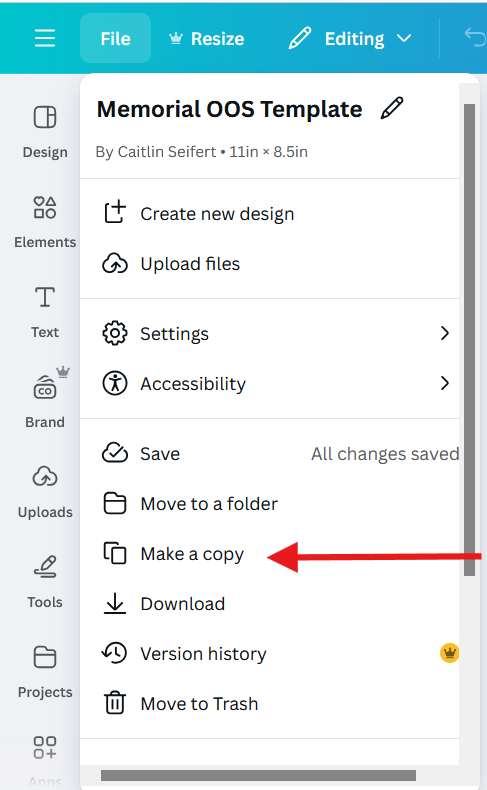
- Make a Copy of the Template
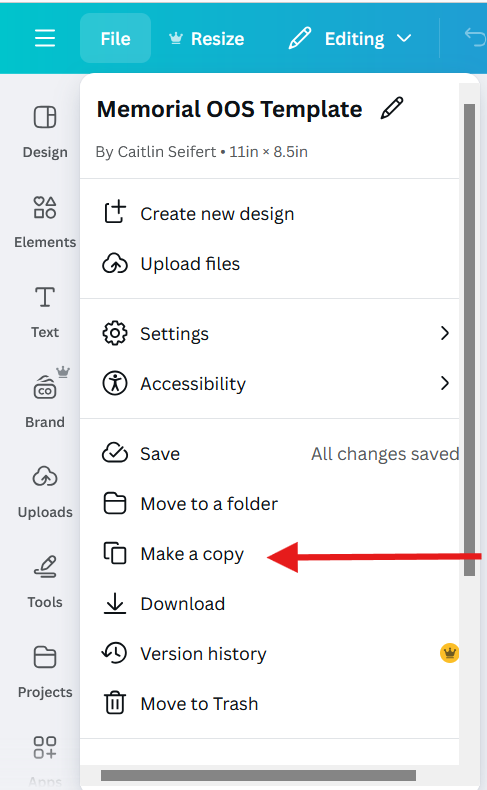
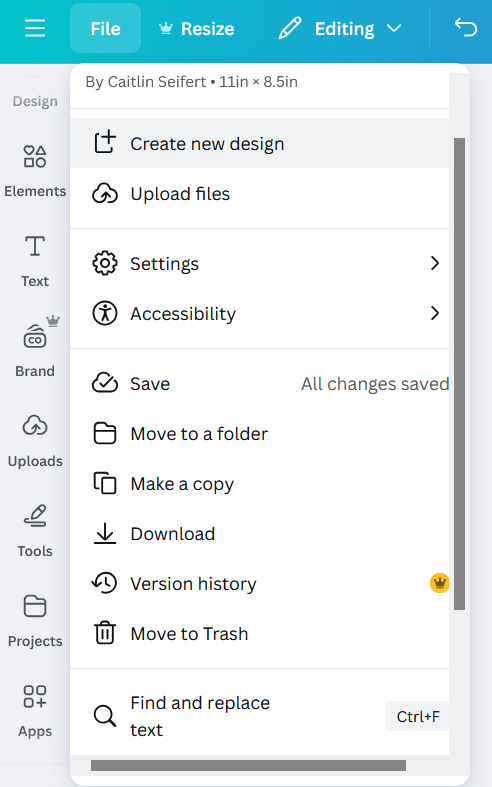
- Select File on the top left hand corner of the website page

- Select "Make a Copy" in the drop down menu
- Rename the copy by clicking on the title on the top right corner of the website page

- Name the new OOS with the First and Last Name of the deceased followed by the words "Memorial OOS"

- Select File on the top left hand corner of the website page
- Navigate to Canva.com



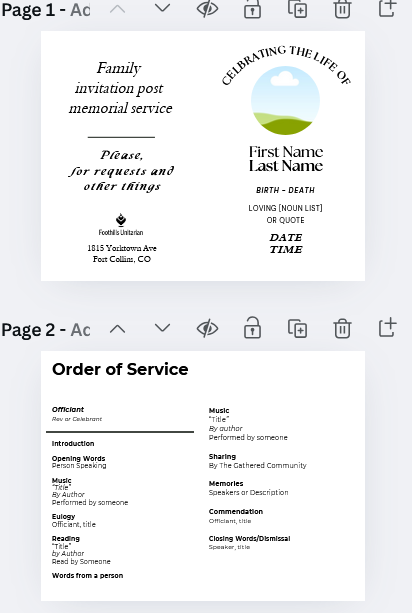
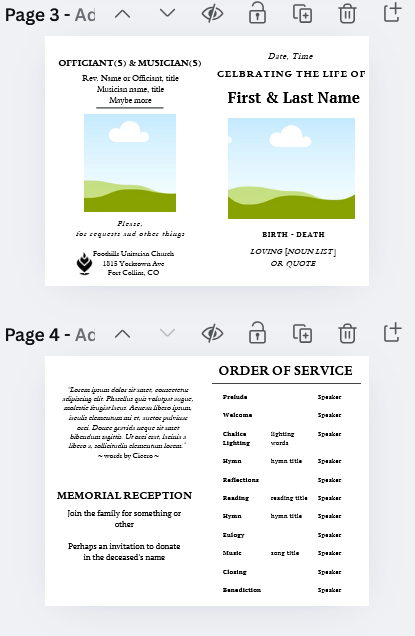
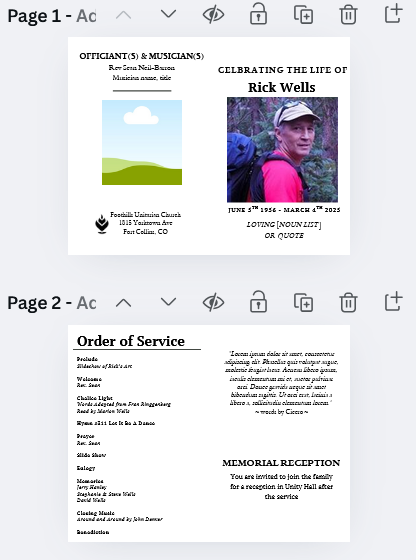
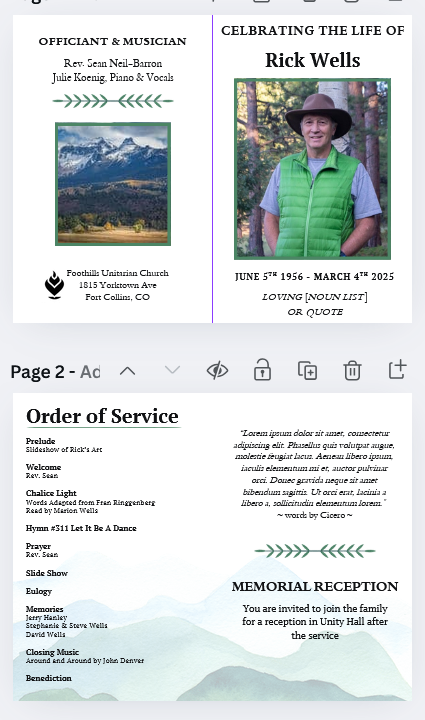
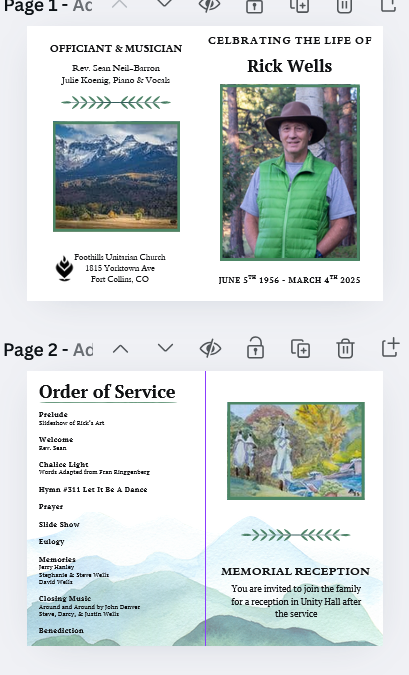
This template includes two different cover pages and two different inside pages (pictured below). In determining which style to use, you may defer to the lead minister if you need help. Design choices can be related to the length of the OOS, opinions of the deceased and family, and any included pictures, quotes, or recipes which the family and/or deceased wishes to be included. You may mix and match which formats you use, just make sure to have a single font in use. It is a subjective choice so if you are unsure, fill in both templates to the best of your ability and go to the lead minister for where to go next. It is unlikely that the first draft will be the finalized OOS.
Once the OOS has been finalized in PCO, you can begin updating each service element into the OOS
- Input OOS information from Services
- While having the Canva OOS open, open PCO Services in a new tab
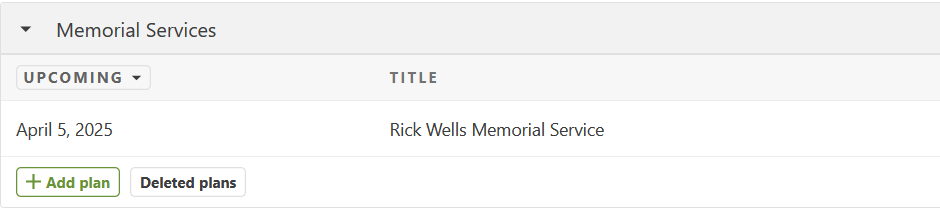
- Scroll down to the bottom of the page until you see the section labeled "Memorial Services". If there are scheduled memorials, you will see them here
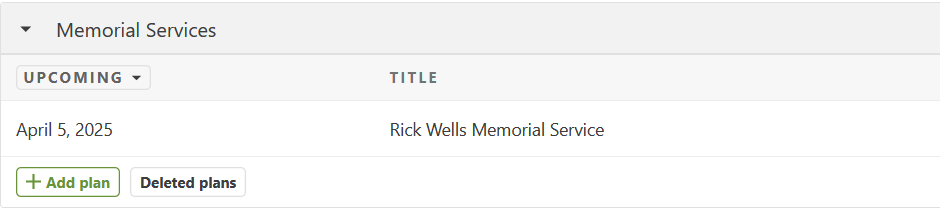
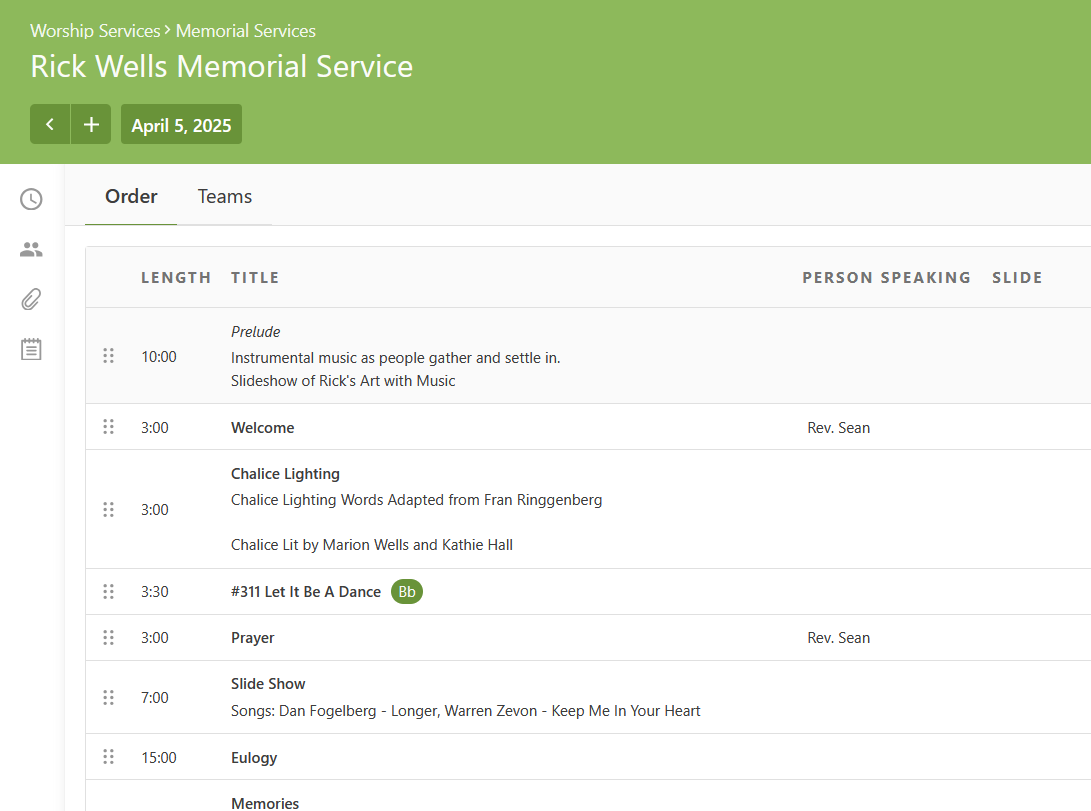
- Click on the memorial service on which you are working
- Input each item's title in the Canva OOS doc under the "Order of Service" label
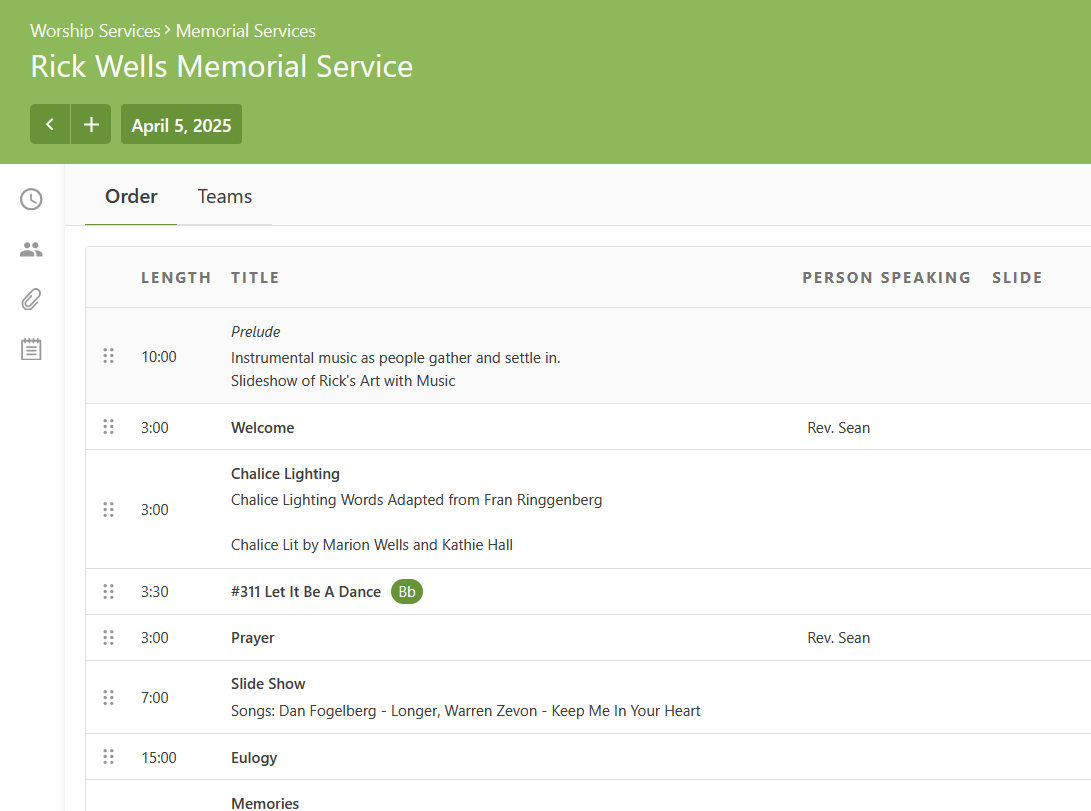
- All service elements should in bold with any speaker or song title information either in plain text or italics
- Add any pictures which have been provided by the family to the
- Once you have a first draft, send it to the lead minister for notes/adjustments. It may not have all elements or colors yet
- Include fields which may be filled in with more information from the family so they can make choices in the OOS process. This may look like:
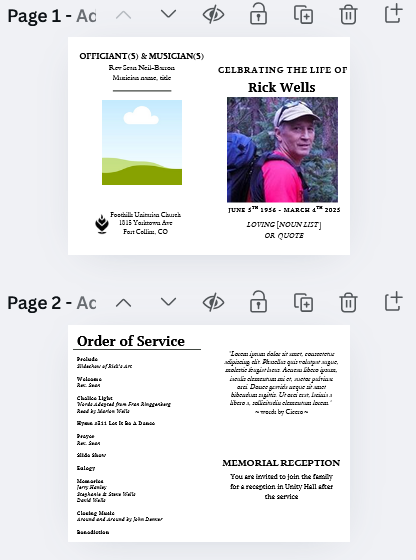
- Include any suggestions which you think would improve the OOS
- Include fields which may be filled in with more information from the family so they can make choices in the OOS process. This may look like:
- Editing and Finalizing the OOS
- Once you have received changes from the lead minister and anyone else involved in leadership of the memorial, you may make changes to the OOS
- When moving to this step of the process, you should begin finalizing formatting. To do this, make sure to include a guide ruler:
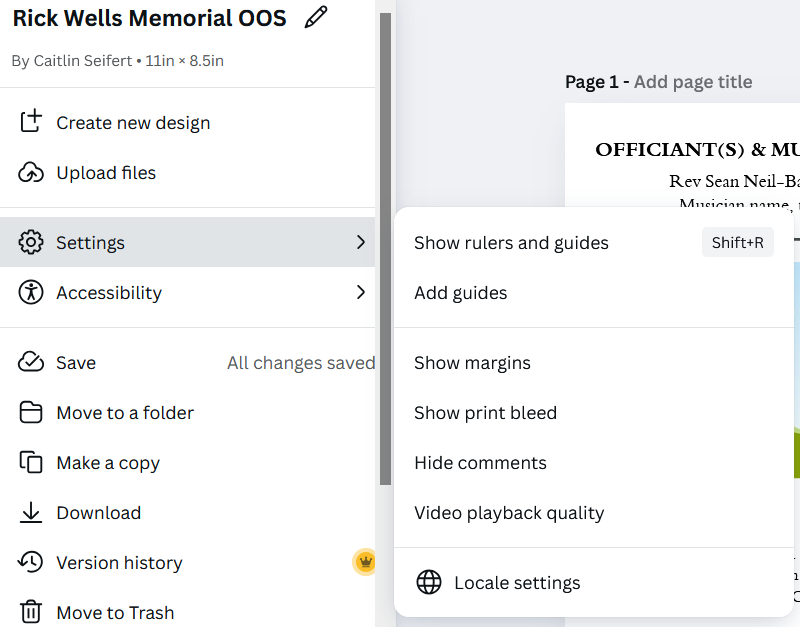
- Click on File to bring down the drop down menu, then click on settings
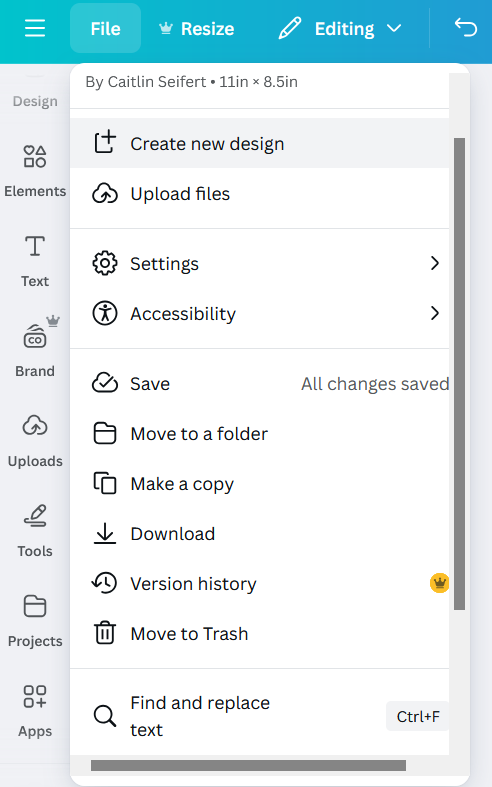
- In settings, select "Add guides"
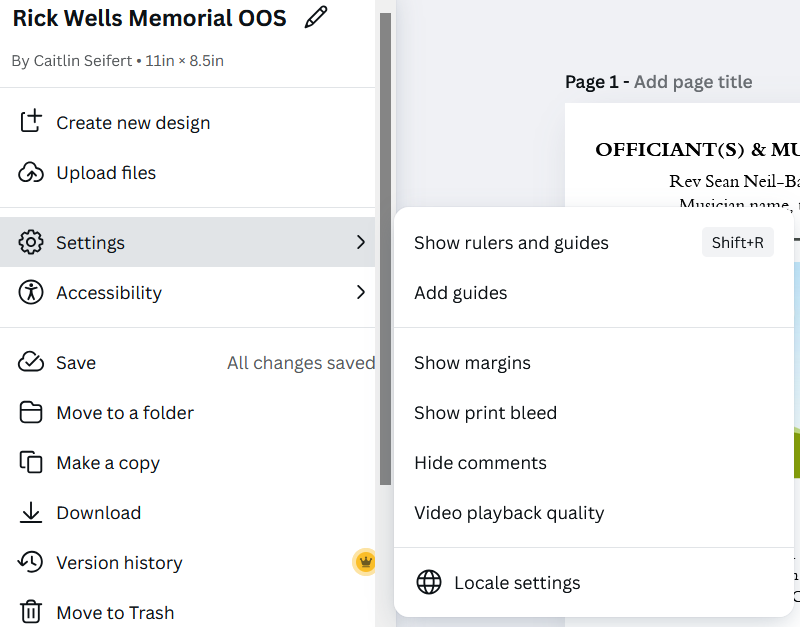
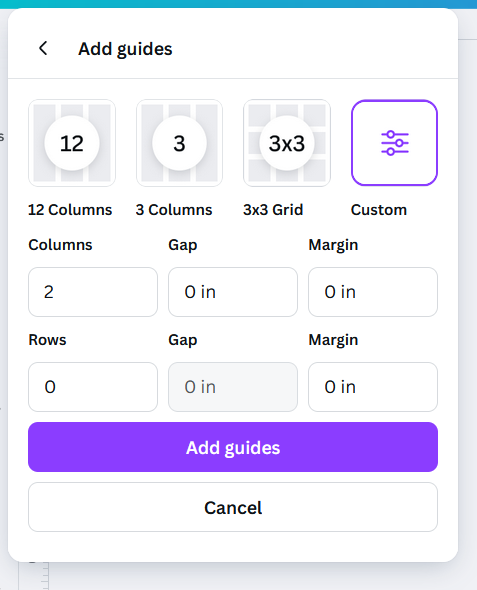
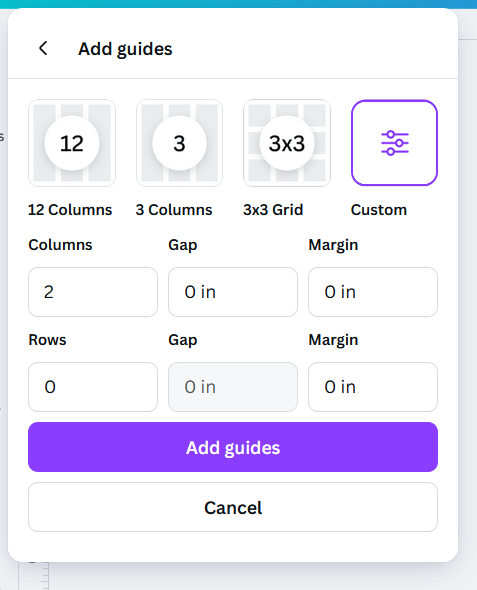
- In order to put a guide line at the center of the OOS, select the custom option, input 2 columns, and set all other settings to 0
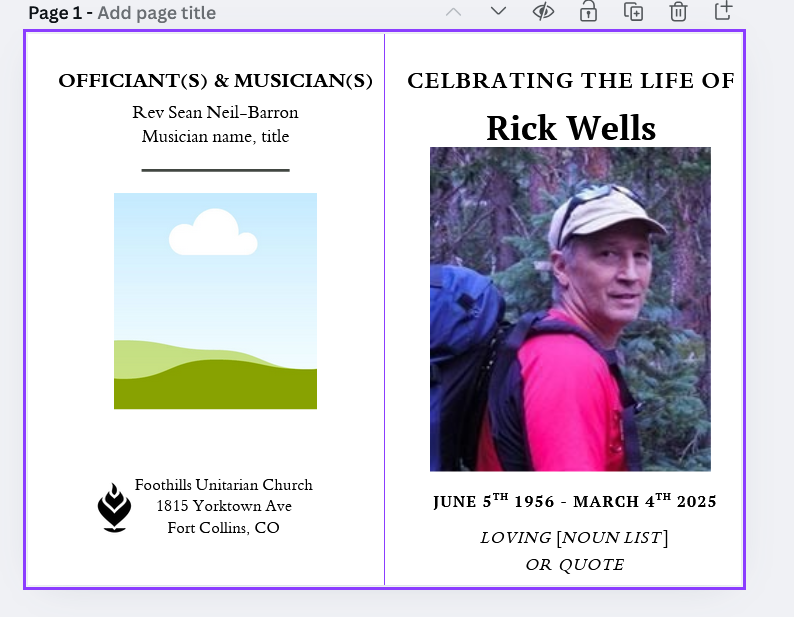
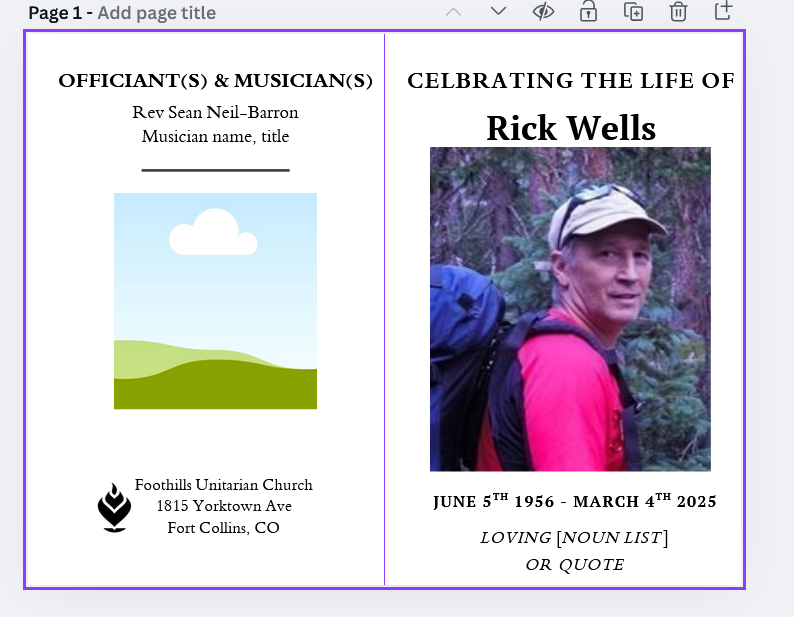
- This will help make sure everything is centered appropriately and will help with printing later. With the guide ruler, the OOS will look like the following:
- Continue the process of editing and seeking approval from the lead minister until a final draft is reached. Once all edits have been confirmed, approved, and finalized, you can move on to printing.
- A not yet finalized draft may look like this:
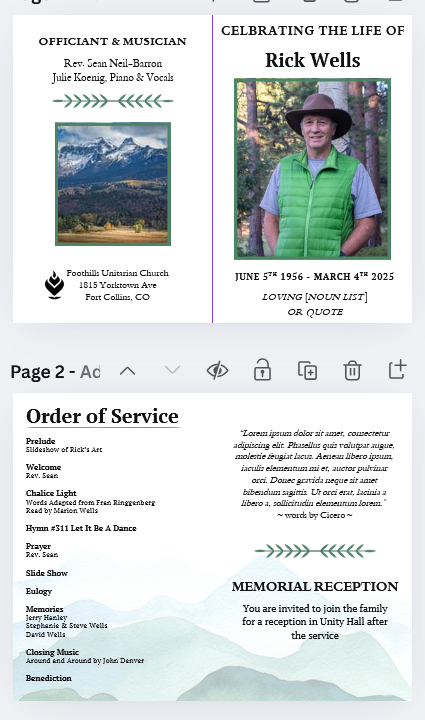
- Whereas, a finalized draft, ready for printing, may look like this:
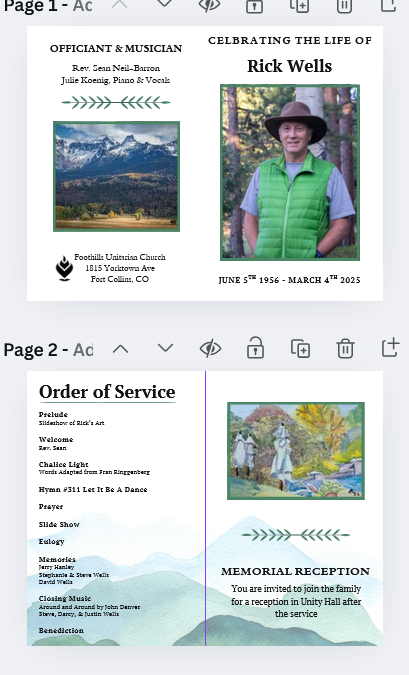
- A not yet finalized draft may look like this:
- Click on File to bring down the drop down menu, then click on settings
- Printing the OOS
- Before printing all copies of the OOS, begin with a test print on standard printer paper.
- Fold the paper in half to gauge if the spacing is correct. Photos and text should be centered and legible.
- To fix any centering issues, adjust the document in Canva and re-print samples until spacing is correct
- Once spacing has been sorted, print OOS onto linen paper. Defer to lead minister and Jenn for total number needed. You will need to print 50-200 copies, depending on expected attendance.
- If time, fold printed copies. If there is not time, leave on the mail desk in the office for volunteers to fold before the service starts.
- Before printing all copies of the OOS, begin with a test print on standard printer paper.
Volunteer Memorial Process
AV/Simulcast Memorial Process
Simulcast Memorial Process
Template Email Re: Accessing a Simulcast/Zoom Memorial Service
Date and Time:
[Date of Service], [Time of Service] ([Timezone])
Location:
The memorial service will be held in person at Foothills and virtually via Zoom.
How to Access the Zoom Memorial Service
-
Go to the Foothills Unitarian Church's Memorials webpage: Foothills UU Memorials (foothillsuu.org/memorials)
-
Click on the specific memorial service for [Deceased's Name].
-
You will find the Zoom link there, which you can click to join the memorial service.
Basics of Accessing a Zoom Meeting
If you're new to Zoom, here's how you can join the meeting:
-
Click the Zoom link provided.
-
You may be prompted to download the Zoom application. If you already have Zoom installed, the meeting should automatically open in the app.
-
Once in the meeting, you'll have the option to turn on or off your video and audio.
-
There is a "Chat" function if you wish to send messages during the memorial, if appropriate.
Recording Availability
We understand that not everyone may be able to attend the live service. A recording will be made available under the "Past Recordings" section on the Foothills UU Memorials (foothillsuu.org/memorials) webpage three days after the service.
Day of Memorial Process
-
Pre-Service
-
Plaque is installed ideally a week before by Rich Roberts.
-
Space is prepared 2 hours before the service or the day before.
-
A classroom is set up in RE for the family to gather before the service.
-
Flowers can be delivered the day before or 2 hours before the service.
-
Guestbook is set out to be signed.
-
-
Before Service
-
Family arrives an hour before the service with items for the memory tables.
-
Caterers arrive at least 30 minutes before to set up food.
-
Volunteers arrive 1 hour before.
-
Minister visits family after sound check, about 30 minutes before the doors open.
-
Family takes their seats right before the service begins.
-
Print up eulogy for the family.
-
-
Post Memorial (Day Of)
-
Memorial service takes place.
-
Reception / guests can visit the memorial garden.
-
Checks collected for musicians.
-
Clean up - requires 3+ volunteers.
-
Send the guest book home with family/partner or make copies of pages and send home with multiple family members.
-
Send home flowers and left over foods
-
Send home pictures, memory table items
-
Have a copy of the sermon available for the family
-
A few order of services to go home with family
-
-
Post Memorial Process
-
Pictures taken of event shared in a google album with family
-
Video of the recorded service is shared on a private page on our Youtube channel with family members.
-
Memorial Email Templates
Invitation to fill out Memorial Form
Hi [Family Members],
I want to begin by sharing how truly honored I am to be part of the process of creating a memorial service for [Name of deceased]. It is a privilege to help honor her life and legacy in a way that reflects her spirit and the love you all shared.
As we begin this process, the first step is coordinating the completion of the Memorial Planning Form at foothillsuu.org/memorialplanning. The form only needs to be filled out once, so you may want to work through it together as a family. We’ve also produced a short video that will guide you through the process, which you can view at this link. Please don’t worry if you don’t have answers to all the questions—this is just the beginning of the planning process, and we’ll work together to fill in any details later on.
Once the form is completed, we can find a time to meet via Zoom to continue planning the service. Please let me know if there are times you are all generally available to meet.
Jenn Powell will be in touch soon to coordinate logistics, but I will take the lead on planning the service itself.
Again, I am deeply grateful for the opportunity to help honor [name of deceased]’s life, and I look forward to walking with you through this process.
Warmly,
Rev. Sean
Foothills Unitarian Church
Sharing Joys and Sorrows with the Congregation
This is a review of the processes by which life passages, joys, and sorrows are shared with the greater congregation.
Caring Corner of the Newsletter
Process for sharing a life passage, joy, or sorrow in the Caring Corner:
- Obtain consent from congregant. Permission to share something in the caring corner is often obtained through our Caring Listener check-ins.
- Request first and last names of people being mentioned, as well as preferred language. If someone says “please name my grandmother in the prayer,” ask for her name and clarity on language.
- Caring Corner is a place to share more detail: Feel free to share more information than in the prayer and links to helpful sites (meal train, obituary, etc.)
- Create an Active Pastoral Prayer note in PCO:. All Active Pastoral Prayer notes will be placed in the Caring Corner unless otherwise indicated
Sharing in prayer in the Sunday service
- Note that we do not have a prayer every Sunday: While the Caring Corner does come out every week, we do not have a pastoral prayer every week on Sunday.
- Obtain consent from congregant. Permission to share something in the caring corner is often obtained through our Caring Listener check-ins.
- Request first and last names of people being mentioned, as well as preferred language. If someone says “please name my grandmother in the prayer,” ask for her name and clarity on language.
- Keep it brief. The prayer is not a place to share extensive detail or make announcements. It is a place to communally hold people with loving care. More detail can be shared in Caring Corner of the newsletter
- Create an Active Pastoral Prayer note in PCO:. All Active Pastoral Prayer notes will be shared in the next pastoral prayer in the Sunday service unless otherwise indicated
Caring Listeners
Caring Listener Role Description
Purpose of the Position:
Caring Listeners are part of the Caring Network at Foothills Unitarian Church.
In collaboration with the Minister for Community Care, Caring Listeners
-
offer emotional support and spiritual companionship to members and friends of Foothills experiencing hardship or transition in their lives.
-
connect individuals and families with other modes of caring within the Foothills Caring Network (e.g. meal delivery, Caring Kits).
Responsibilities:
-
Listen compassionately to those who need a caring presence.
-
Check in with people (usually via phone or email) to see how they are doing and if they need support.
-
Document connections made and needs outstanding.
-
Attend monthly reflection meetings and initial training.
-
Be available to ministers via email and phone; read/listen and respond to messages within 24 hours (excepting vacations and other unusual, occasional circumstances).
-
Refer care recipients to minister(s) and/or professional crisis assistance as necessary and appropriate.
-
Participate in annual Caring Check-In each winter: placing calls to church members whom we haven’t see in a while to see how they are doing and find out how we might offer support
Qualifications:
-
Caring Listeners will have good boundaries and open, compassionate spirits.
-
They will be able and willing to communicate, including reaching out to those they don’t yet know.
-
Caring Listeners are expected to maintain confidentiality.
-
They will be reliable with excellent follow-through.
-
Caring Listeners will have been significantly involved at Foothills for at least 6 months and will be a member of Foothills Unitarian Church. If an applicant is not yet a member, they have a plan in place to partner with Foothills as a member.
-
In accordance with our Safe Congregations standards, we perform confidential basic background checks on Caring Listeners.
Amount of Time Required:
Caring Listeners typically devote about ten hours a month to this role.
Length of Commitment:
Two years, with the possibility of additional one-year renewal. Training will take place in August.
Training and Support Provided by:
Rev. Elaine Aron-Tenbrink, Minister of Community Care
Chaplain Carla Vogel during Elaine’s sabbatical April 1 - July 31, 2026
Responsible to:
Rev. Elaine, with Rev. Sean or Rev. Gretchen made available in her absence.
Caring Listener Recruitment Process
NOMINATION
Members of the congregation and staff are encouraged to nominate someone as a caring listener using this form: https://foothillsuu.churchcenter.com/people/forms/1184458
All those nominated will be sent an application by the Minister of Community Care or members of the Caring Listener Recruitment Team
COMPLETE APPLICATION
All interested in serving as a caring listener will complete this application by Tuesday, April 28, 2026: https://foothillsuu.churchcenter.com/people/forms/1184446
The application must be accompanied by two references using this form:
https://foothillsuu.churchcenter.com/people/forms/1189901
INTERVIEWS
Applicants will be interviewed by all three members of the Caring Listener Recruitment Team. Ideally, these interviews are in person but Zoom can also work. These interviews can begin as soon as the team is ready — no need to wait until after the April 28 application deadline has passed.
Questions for the interview include:
What brought you to Foothills?
What drew you to apply to the Caring Listener team?
What gifts do you bring to this role?
How would you handle an interaction with someone with a lot of chaos in their life? (possibly ask for an example?)
Our Caring Listeners offer peer support through deep listening and asking open, honest questions. This is different from a friendship or a therapeutic relationship. Caring Listener is responsible for holding this boundary. How do you feel about this? Where in your life do you need to hold good boundaries, either professionally or personally?
Where in your life do you keep confidences? Who was a mentor or example to you in keeping healthy confidences?
When was a time in your life when someone really listened to you and it made a difference?
Are you comfortable making cold calls, or talking with people you don't know?
Caring Listeners need to respond to calls or texts within 24 hours. Will that work for you? (Of course, you are welcome to take breaks or go on vacation — we are a team that can cover for one another.)
Is there a particular population or life experience that you feel you’re uniquely positioned to offer support around?
Tell us about your hobbies and interests. What do you do in your free time?
SELECTING CARING LISTENERS
Caring Listeners will be selected by Friday, May 22, 2026. There are three positions open: Two geographic-based team members who will make check-in calls AND one-on-one peer support and a floater who will only do one-on-one peer support..
Recruitment team members will considering the following in selecting Caring Listeners.
- Skills and capacity to carry out duties of caring listeners
- Overall balance of the team in terms of gender, age, race, sexual orientation, life experience (professional, personal).
- Rev. Sean is available at Sean@foothillsuu.org or 617-817-0531 to consult and ask questions.
Caring Listener Recruitment Team will reach out to selected Caring LIsteners with an invitation to join. If there are many more applicants than spots, please invite them to apply again.
CALENDARING
Select training times: Please select an August orientation date that works for new Caring Listeners. Training will take four hours — either two 2-hour blocks or one four hour block.
4 hour blocks could take place on these days between 10am-4pm: August 11, 12, 13, 14, 18, 19, 20, 21.
2 hour blocks could take place on these days between 5-8pm on weeknights: August 11, 12, 13, 18, 19, 20.
If none of these work, the week of August 25 can work.
Select Caring Listener Potluck times: After the above training has been scheduled, Caring Listener Potluck to follow on either of these days: Sunday, August 16 or 23 from 12:30-2:15pm. (If neither works, find a time from 6-8pm on a weeknight). Find a time that works for the new people, then share this time with Bugs Seifert (they/them - Bugs@foothillsuu.org) who will share out with the greater Caring Listener team.
CONCLUSION OF PROCESS
This process will be completed by June 1, 2026. Please share names of new Caring Listeners and scheduling outcomes with Bugs Seifert (they/them - Bugs@foothillsuu.org) and Rev. Sean Neil-Barron (he/him - Sean@foothillsuu.org) . Please ask Bugs to schedule space for trainings (225 should be fine) and potluck.
Dispatching Caring Listeners: Reaching out on behalf of the Caring Network
What exactly do I do when I reach out to someone?
Make first contact by phone call first.
If no one answers, leave a voicemail and follow up with an email.
Here’s a handy script. Feel free to modify as feels appropriate.
Greeting: My name is _____, I’m a member of the Caring Team at Foothills Unitarian Church. I understand that (describe situation). Rev. Elaine asked me to reach out and to let you know we’re thinking about you.
-
Open-ended question How are you doing? (and other open ended questions as appropriate)
-
Our Caring Team is here to support you:
-
Meals: Would meal delivery be helpful?
-
Caring Kit: Could we drop off a Caring Kit for you? It’s a bag with a few items of encouragement and comfort that our Caring Team would leave on your doorstep.
-
Share in Sunday service and/or newsletter: Would you like us to mention this in the Joys and Concerns during the Sunday morning service? How about in the next week’s email newsletter in the Caring Corner?
-
Financial help: Are you in need of financial support? (If so, let them know that Elaine will contact them about the ministerial discretionary fund)
-
Who are their people? Is there a place in the church where you are really connected that I should let know? i.e. are you in a small group, the choir, an ongoing group etc.?
-
Follow-up I’d like to follow up with you and just see how things are going in a couple weeks/days/etc. Would you be ok with a phone call, or would you prefer an email or text?
After you connect with someone, submit the Caring Note Documentation Form
Click here (and bookmark for the future!)
https://foothillsuu.churchcenter.com/people/forms/791892
Procedure for Pairing Caring Listeners with Care Receivers
Procedure for Pairing Caring Listeners with Care Receivers
When the minister for community care receives a request for one-on-one peer support from a Caring Listener, these are the steps to follow:
1. INFORMING: Minister for Community Care sends potential care receiver this information via email:
Caring Listeners are trained, supervised volunteers at Foothills who provide emotional and spiritual support through listening and non-judgemental conversation. They are peers, not professional caregivers; their role is different from a counselor, therapist, or minister.
Caring Listener meetings typically last for one hour, perhaps weekly or every other week, in a setting that you've agreed on together. The purpose of the caring visits is to meet the emotional and spiritual needs of the care receiver. The focus of the conversation is on the care receiver and his/her/their thoughts, feelings, and needs.
To get started, I would reach out to someone on our Caring Listener team to find someone who might be a good fit. You'd meet once in a mutually-agreed-upon place for a conversation. If you'd both like to continue, you'd make a plan for a schedule to meet regularly. After 6 sessions, you'd have a check-in conversation to discuss how it’s going and if you want to continue.
When the relationship draws to a close, there will be a concluding conversation, which offers an opportunity to reflect on your time together and what was helpful.
If this is something you'd like to move forward with, are there any qualities or identities in a Caring Listener who would feel most comfortable to you? Or anything that would be a dealbreaker?
2. POSSIBLE CONVERSATION WITH MINISTER: If they would like to move forward, the minister MAY choose to meet with the potential care receiver. If it is unclear whether the potential care receiver would be a good match for peer support, the minister of community care will meet with them — ideally in person, but zoom or, as a last resort, phone, could also work.
In this conversation, the minister is trying to ascertain whether one-on-one peer support is a good fit for this individual. They will look for the following:
- Does the depth of the support needed by the person match the skill set of the Caring Listener? Minister will refer to professional support if needed and not currently being received — or will offer pastoral support themselves if appropriate.
- Is the care seeker actually ok with peer support, or are they really looking for a friendship?
- Does the care seeker seem able and willing to abide by the Foothills Covenant of Right Relations?
3. MATCH CARE RECEIVER WITH CARING LISTENER: Minister of Community Care matches the care receiver with a Caring Listener. The Caring Listener will reach out to the Care Receiver to schedule an hour-long conversation at a time and place that works for both.
Depending on the situation, this first meeting could take place in a public place (e.g. coffeeshop or library), in the care reciever’s home, or at Foothills. To reserve a room at Foothills, please use the Staff Use Room Reservation form and select “Caring Listener volunteer."
4. CHECK IN AT END OF FIRST CONVERSATION: At the end of the initial conversation, the Caring Listener will ask if they’d like to meet again, or will follow up with this question if it’s unclear in the moment.
5. SIGN AGREEMENT TO RECEIVE CARE: If there is a second visit, the Caring Listener will go over the Agreement to Receive Care and they’ll both sign it. The signed copy will stay with the Caring Listener.
6. CHECK IN AFTER 6 VISITS: Per the Agreement to Receive Care, the Caring Listener and care receiver will check in after 6 visits to evaluate how it’s going and whether they’d like to continue. If they continue, they’ll continue to check in periodically.
Caring Listener Documents
Bugs has digital copies of all sheet we use to train caring listener.s
Supervision and Support of Caring Listener Team
Find meeting agendas of Caring Listener team here: https://docs.google.com/document/d/13Vd3LpQV2a_7-gGP-m5PFyz4tVAEN188_KiiaRMam1g/edit?usp=sharing
Caring Documentation
Overview of Caring Documentation
The Minister for Community Care is responsible for all caring documentation in Planning Center Online (PCO).
General guidelines for notes in PCO
- Document the basic, “need to know” information. Keep notes succinct.
- Write for a future audience that is not you. Don’t make assumptions that the reader of the note knows what you know about the person. (e.g. the name of the person’s spouse)
- Caring Notes and Pastoral Notes can also be used to document verbatim encounters with congregants (e.g. an email setting a boundary)
All notes are created in the People module of PCO: https://people.planningcenteronline.com/
Caring Notes
- Documentation of pastoral care provided, change in life circumstances in congregant, or attempt at offering pastoral care. Visible to ministers, caring listeners, and key staff members
- Example of caring note: Jane Doe will be having hip replacement surgery on April 25. She is well supported by her partner, Jill, and her sisterhood group. She would appreciate a caring kit, but doesn’t want to be mentioned in the caring corner or prayer. CL Rick Jones will follow up.
- Process:
-
Open PCO People profile of the person about whom you wish to write the note
-
Click “Notes” > New Note >
-
Category = Caring Notes
-
Type text into field of caring note. If this is documenting care offered by someone other than you, please name them at the beginning. Use “CL” as an abbreviation for Caring Listener (see above example)
-
Click “Create”
-
Pastoral Notes
- Documentation of sensitive information regarding spiritual/emotional status of congregant. Visible only to ministers.
- Example of pastoral note: Jane Doe disclosed that she suspects her spouse has dementia. I was the first person she mentioned this to — she doesn’t plan on sharing with anyone else at this time.
-
Process:
-
Open PCO People profile of the person about whom you wish to write the note
-
Click “Notes” > New Note >
-
Category = Pastoral Notes
-
Type text into field of pastoral note.
-
Click “Create”
-
- Very Sensitive Information: If you have a concern about putting very sensitive information in PCO, share it with the other ministers in a Signal chat instead.
Active Pastoral Prayer Notes
- Documentation of a prayer or sharing of a life event. Please write using language that could easily be used in a prayer. Unless otherwise specified, Active Pastoral Prayer Notes will trigger the three things below. Please note if any of these is not desired by the congregant.
- Pastoral prayer: This person will be mentioned in the next pastoral prayer in a Sunday service. This may NOT be the upcoming Sunday, as we do not consistently offer pastoral prayers on a weekly basis.
- Caring corner of the newsletter: This person will be mentioned in the caring corner located at the bottom of the upcoming Friday e-newsletter.
- Caring cards: This person will receive cards from our Caring Card Team.
-
- Examples of Active Pastoral Prayer note: Our love is with Jane Doe as she recovers from cardiac surgery. We celebrate the life and mourn the death of Foothills member John Doe, who passed away early Monday morning at age 87.
-
Process:
-
Open PCO People profile of the person about whom you wish to write the note
-
Click “Notes” > New Note >
-
Category = Active Pastoral Prayer Notes
-
Type text into field of active pastoral prayer note.
-
Click “Create”Ac
-
Caring Kit Notes
- Caring Kit Notes: This documents what kind of caring kit the congregant received. This note gets created as part of the Caring Kit workflow. [link here]
Community Care Fund Notes
This note documents the receipt of Community Care Funds by stating the amount received and the reason for funds. This note helps us track community care funds, which are disbursed to congregants just once or twice a year. Formerly known as Ministerial Discretionary Fund Notes.
- Example of Community Care Fund note: John Doe received $700 from the Community Care Fund for auto repairs.
-
Process:
-
Open PCO People profile of the person about whom you wish to write the note
-
Click “Notes” > New Note >
-
Category = Community Care Fund Notes
-
Type text into field of Community Care Fund note.
-
Click “Create”
-
Safety and Behavioral Notes
Examples of notes:
Example Safety and Behavioral Note 1- Senior with Dementia
- Description: This member has been diagnosed with dementia. They may exhibit forgetfulness, confusion about locations and people, and difficulty with communication.
- Safety Considerations: Ensure a calm and familiar environment. Avoid overwhelming them with too much information or too many people at once. Be patient and offer gentle reminders as needed.
- Behavioral Strategies: Speak clearly and use simple sentences. Maintain eye contact to ensure they feel engaged. It's crucial to monitor their comfort and safety, especially during group activities.
- Emergency Contacts: [List of Family Members or Caregivers], [Contact Information]
Example Safety and Behavioral Note 2 - Young Adult with Emotional Disabilities
- Description: This member has emotional disabilities that can result in intense emotions expressed in non-normative ways. They may have sudden outbursts or show extreme emotional reactions to situations.
- Safety Considerations: Be aware of the member's personal space and comfort levels. Avoid confrontational approaches and provide a quiet space where they can calm down if needed.
- Behavioral Strategies: Use a calm and reassuring tone. Listen actively and acknowledge their feelings. Provide clear, consistent, and predictable responses. Prepare for potential emotional outbursts with a de-escalation plan.
- Emergency Contacts: [Therapist/Counselor's Name], [Contact Information]
Example Safety and Behavioral Note 3- Sex Offender Attending Church
- Description: This member is a registered sex offender and is currently on parole. They are subject to a Limited Access Agreement as part of their involvement in our church community.
- Safety Considerations: Adherence to all legal requirements and parole conditions is mandatory. The member is not allowed in certain areas and situations as stipulated by the Limited Access Agreement to ensure the safety of the community and compliance with legal restrictions.
- Limited Access Agreement - Conduct Rules:
-
- Area Restrictions: No access to children's or youth areas.
- Supervised Participation: Must be accompanied by a designated supervisor at all times on church premises.
- No Contact with Minors: Prohibited from any form of contact with children or youth.
- Event Limitations: Only attends specific, pre-approved church services/events.
-
-
Process:
-
Open PCO People profile of the person about whom you wish to write the note
-
Click “Notes” > New Note >
-
Category = Safety and Behavioral Notes
-
Type text into field of Safety and Behavioral note.
-
Click “Create”
-